Patent Viewer
The Patent Viewer is where you read and analyze patents. Every patent in GoVeda opens here, whether you arrive from search results, a GoVeda Agent answer, or a direct URL.
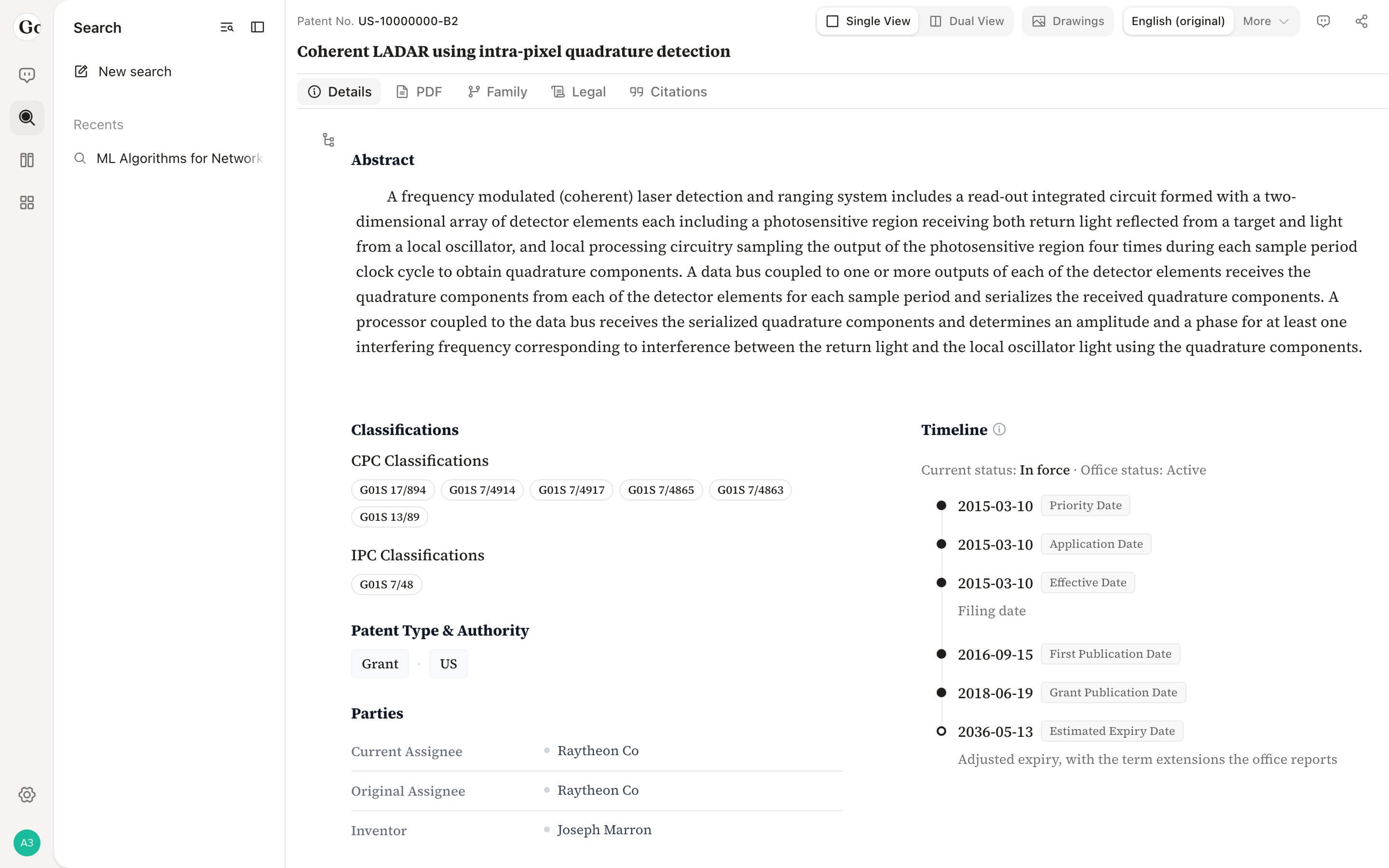
The patent body auto-translates to your language (Chinese, Japanese, Korean, French, German, or Spanish) when it isn’t natively available. See Language and translation.
Tabs
The tab bar across the top organizes the patent into focused views:
| Tab | What it shows |
|---|---|
| Details | The full patent document: abstract, classifications (CPC/IPC), assignees and inventors, date timeline, claims, and description. A floating table of contents lets you jump between sections. |
| The original patent office document rendered in-browser with download support. | |
| Family | Related filings in other countries and regions that share a common priority. Each row shows the Publication Number, Publication Date, Application Number, Application Date, Legal Status, and Estimated Expiry. |
| Legal | Legal event history from INPADOC: assignments, fee payments, grants, lapses, and appeals. |
| Citations | Prior art cited by this patent (backward citations), non-patent literature, and later patents that cite it (forward citations). |
Drawings
The Drawings toggle in the header opens a side panel with the patent’s figures. It stays open alongside whichever tab you’re reading, so you can view claims and figures at the same time. On mobile, Drawings appears as a separate tab.
Layout options
- Single View fills the screen with one tab at a time.
- Dual View splits the screen into two independent panels, each with its own tab bar. Read the description on the left while viewing the citations or family on the right.
Your layout preference is remembered per patent.
Ask GoVeda Agent
Select the Ask GoVeda Agent icon in the header to start a new chat with this patent already referenced in the message box. Nothing is sent until you add your question and send it. See Get Started.
How to open a patent
- From search results. Select a result card.
- From a GoVeda Agent answer. Select a patent number in an answer to open it in the side panel, then select Open patent in new tab for the full patent page. See Check sources and patent links.
- By URL. Navigate to
/patent/[UCID](e.g.,/patent/US-12345678-B2), or type a patent number into the search box and select from autocomplete. - From the Citations or Family tab. Select any publication number to open that patent.
When you arrive from search results, navigation arrows let you step through results without returning to the list. A back button in the header returns you to where you came from — for example a citation list, a patent family, or a search — when you navigated from within GoVeda; it stays hidden on direct visits.
Sharing
The Share button in the header copies a link that lets anyone view the patent without signing in.
In this section: