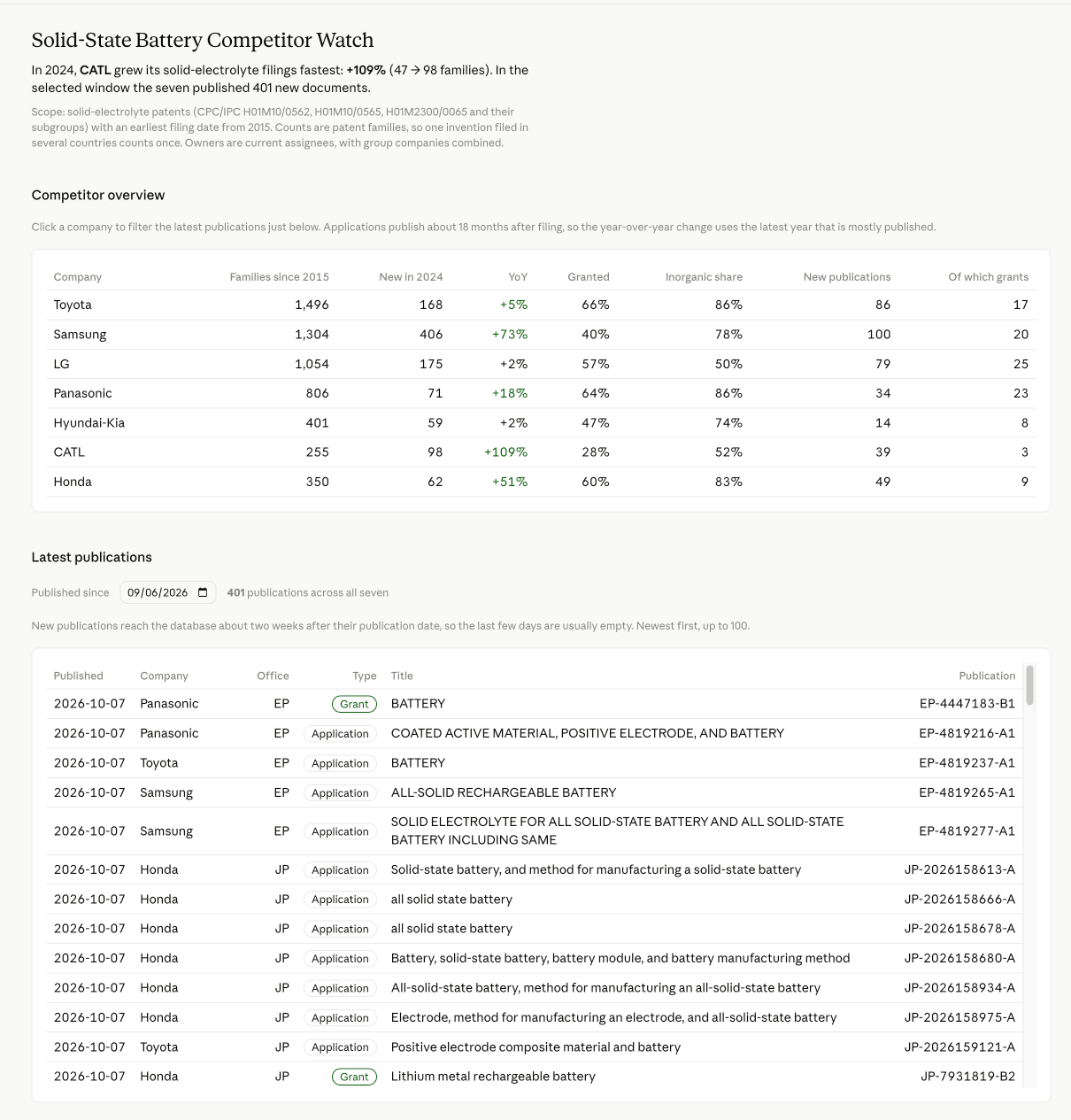
This is a competitor patent monitoring dashboard we built in Claude. It watches seven companies filing solid-state battery patents, and every number on it comes from a live query to the GoVeda patent database, run again each time the dashboard opens.
Competitor patent monitoring usually means a report someone compiles once a quarter, which is out of date the week it lands. Claude Dashboards , in beta on paid Claude plans, work with your connectors. A dashboard built on GoVeda Patent stays current without being rebuilt, because it reruns its queries each time it opens. This post explains what it shows, how it differs from a one-off page Claude generates, the steps and prompt we used to build it, what the data says today, and what it costs to keep running.
What does a competitor patent dashboard show?
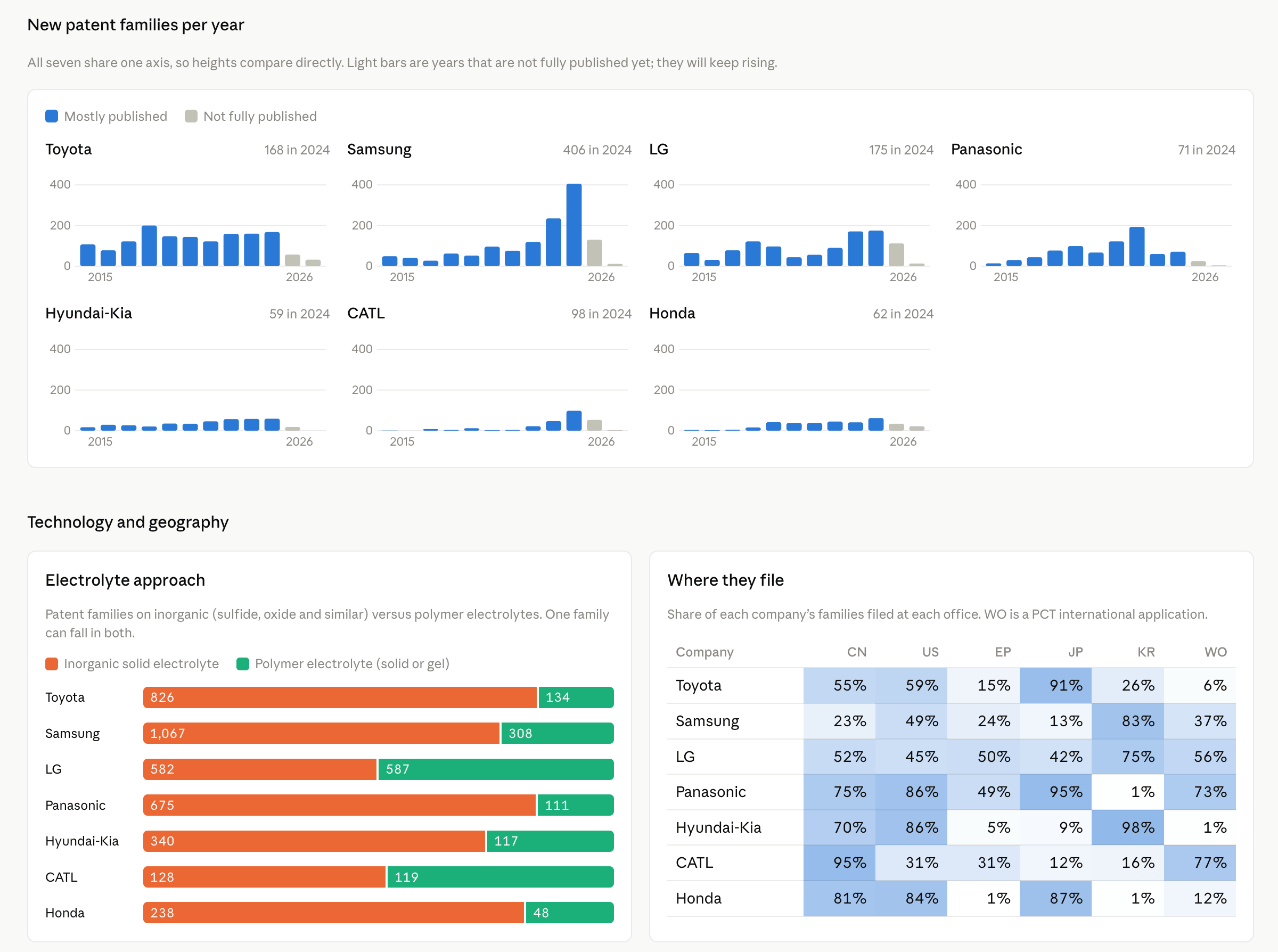
Our example tracks Toyota, Samsung, LG, Panasonic, Hyundai-Kia, CATL and Honda in solid-state electrolytes. It has four parts, and each one answers a question a competitive-intelligence or IP team gets asked often.
| Part | Question it answers |
|---|---|
| Competitor overview table | Who has the biggest portfolio, and who is speeding up? |
| Latest publications | What did a competitor publish in the last few weeks? |
| New patent families per year | How has each company’s filing changed over ten years? |
| Electrolyte approach and filing offices | Which technical route does each company favour, and where does it seek protection? |
The latest publications sit right under the overview, because they are what you check most often. Clicking a company in the overview table filters the list to that company, and a date field sets how far back it goes.
How is a live dashboard different from a one-off page?
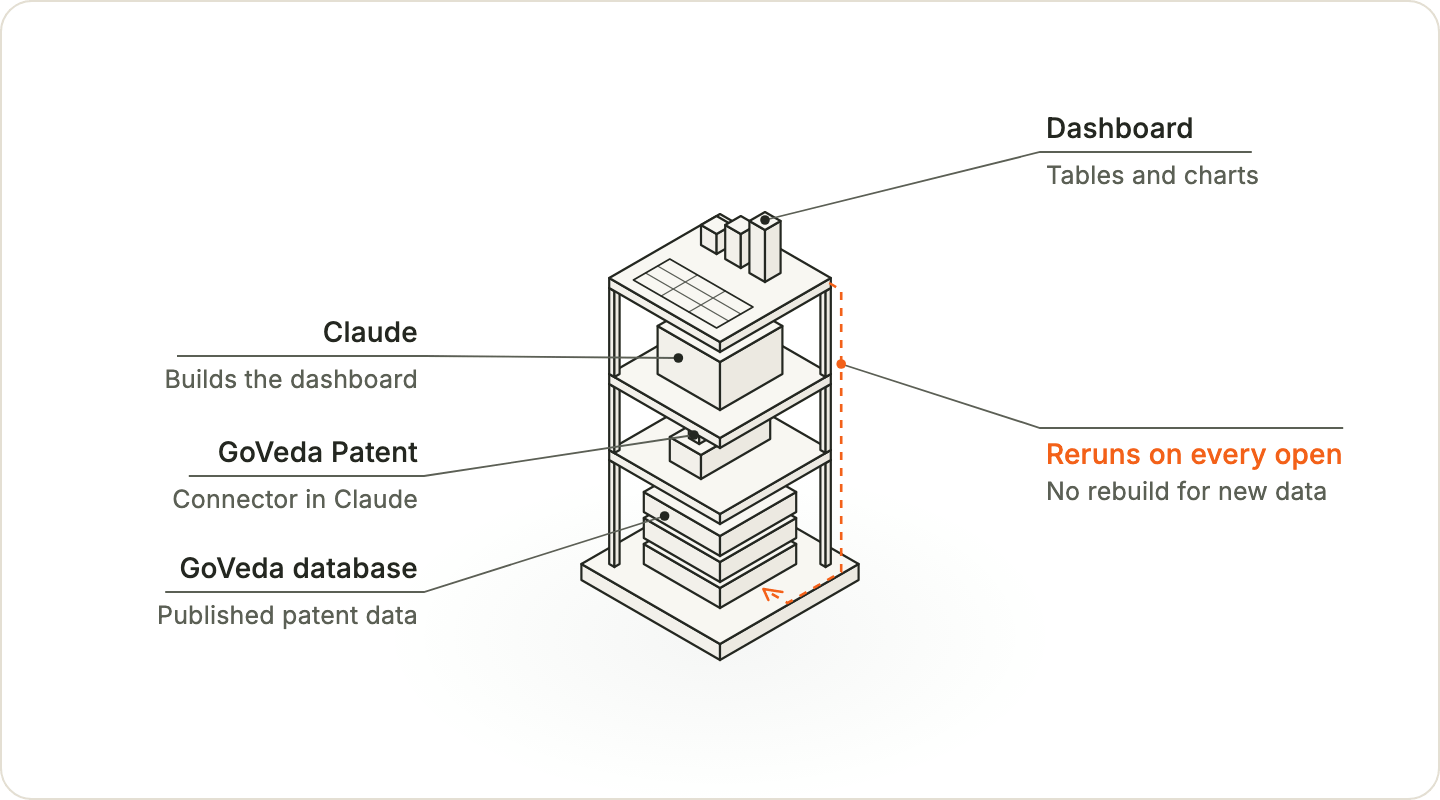
If you ask Claude for a chart of competitor filings, Claude may build a one-off page rather than a live dashboard: it runs the queries once, writes the results into the page and hands it over. A live dashboard keeps the queries, so it goes back to the patent database whenever you open it.
| One-off page | Live dashboard | |
|---|---|---|
| Data | A snapshot from the day it was made | The latest data in the GoVeda database every time you open it |
| New publications | Missing until you ask Claude to rebuild the page | Show up once the database records them |
| Filters | Limited to the data already in the page | Each filter runs a fresh query against the full database |
| Trust | Figures on their own | Every figure links to the query behind it, and the rows that query returned can be downloaded as CSV |
| Upkeep | Rebuild and re-check for each update | Build once, reuse every week |
| Team use | Everyone works from the same old copy | Each colleague sees current data through their own GoVeda connection |
A one-off page is fine for a snapshot you want to keep as it is, such as a quarterly report. For anything you follow over time, the dashboard does the rebuilding for you.
How do you build one in Claude?
Connect GoVeda Patent
Add GoVeda Patent from Claude’s connector directory and sign in once. Using GoVeda Patent Inside Claude walks through it with screenshots.
Paste this prompt
Copy the prompt into a new Claude chat:
I want to build a dashboard in Claude that monitors my competitors'
patents, using GoVeda Patent data.

Before you build anything, help me decide what to track:
- Ask which technology area I want to monitor.
- Ask which competitors I already follow. This is optional; I may not have
  a list yet.
- Suggest classification codes for the technology area, then use GoVeda to
  find the companies filing the most in it, including newer entrants and
  ones I did not mention.
- Look up the patent-owner names for each company, including subsidiaries
  and group companies.
- Ask which patent offices matter to me.
Show me the proposed companies and codes, and wait for my confirmation.

The dashboard should show:
- an overview of each competitor: portfolio size, new patent families in
  the latest mostly published year, the change from the year before, and
  the share granted
- their latest patent publications, newest first, with a filter by company
  and date
- new patent families per year for each company, on one shared scale
- where each company files, by patent office
- a breakdown of technical approaches within the area, if the
  classification codes support it

Keep the data live, so the dashboard runs its queries again each time I
open it.
Claude starts with the technology area you want to monitor. It suggests classification codes, finds the companies filing most actively in that area, adds any competitors you already follow, and shows you the list to confirm before it builds anything. After that, ask for changes in the same chat: another competitor, a different time window or a chart you prefer.
Once built, the dashboard keeps its queries. It runs them again when you open it, so you do not need to rebuild it to see new data.
What does the solid-state battery data say?
The figures count simple patent families classified in CPC H01M10/0562 (inorganic solid electrolytes), H01M10/0565 (polymer electrolytes, solid or gel) or H01M2300/0065 (solid electrolytes), with an earliest filing date from 2015, under the entity names we confirmed for each company: Toyota Motor; Samsung SDI and Samsung Electronics; LG Energy Solution and LG Chem; Panasonic Intellectual Property Management, Panasonic Corp, Panasonic Holdings and Panasonic Energy; Hyundai Motor and Kia; Contemporary Amperex Technology (CATL); and Honda Motor. The table compares 2023 with 2024, the latest year that is close to fully published. The table shows the share of families with a PCT filing; the inorganic share is covered under electrolyte routes below.
| Company | Families since 2015 | 2023 | 2024 | Change | Granted | With a PCT filing |
|---|---|---|---|---|---|---|
| Toyota | 1,496 | 160 | 168 | +5% | 66% | 6% |
| Samsung | 1,304 | 235 | 406 | +73% | 40% | 37% |
| LG | 1,054 | 171 | 175 | +2% | 57% | 56% |
| Panasonic | 806 | 60 | 71 | +18% | 64% | 73% |
| Hyundai-Kia | 401 | 58 | 59 | +2% | 47% | 1% |
| Honda | 350 | 41 | 62 | +51% | 60% | 12% |
| CATL | 255 | 47 | 98 | +109% | 28% | 77% |
Who holds the largest portfolio?
Toyota, with 1,496 families since 2015. It filed between 122 and 200 new families a year from 2017 to 2024, and 159 to 168 in each year from 2022 to 2024. Two thirds of its families include a granted patent.
Who is filing faster?
CATL doubled its new solid-electrolyte families, from 47 in 2023 to 98 in 2024. Samsung added the most in absolute terms: 406 new families in 2024, up from 235, the highest of the seven.
Panasonic remains well below its peak. Across the four Panasonic entity names we grouped, it filed 193 families in 2022, then 60 in 2023 and 71 in 2024, an 18% rise on 2023.
Which electrolyte route does each company favour?
Five of the seven file mostly on inorganic electrolytes. LG and CATL are close to an even split: LG has 582 families on inorganic and 587 on polymer electrolytes (solid or gel), and CATL has 128 and 119. A family can carry both codes, so the two numbers overlap.
Where do they seek protection?
CATL and Panasonic use the PCT most: 77% and 73% of their families include an international application. Toyota rarely uses the PCT (6%) but files directly abroad, with 882 families in the US and 816 in China. Hyundai-Kia and Honda file little in Europe: 21 and 3 families at the EPO.
These are filing signals. They do not measure product readiness, patent quality or market share.
How should you read the numbers?
A few conventions shape every figure on the dashboard.
- Patent families, not documents. One invention filed in several countries counts once. See the patent glossary for the definition.
- Recent years are incomplete. Under 35 U.S.C. 122(b) (MPEP 1120 ), most US applications are published promptly after 18 months from the earliest filing date they claim, with exceptions such as applications filed with a non-publication request. Many other offices publish on a similar timetable. The dashboard shows years that are not fully published in a lighter colour.
- New publications arrive with a short delay. The GoVeda database is updated weekly, so the last few days of the latest publications list can be empty.
- The scope is electrolytes. Patents on electrodes or cell design that carry none of the three codes fall outside it.
- Owners are current owners. A patent assigned to another company after filing counts for its new owner, and group entities are combined only as you list them.
What does it cost to keep running?
Each time the example dashboard opens or refreshes, it runs three queries: two statistics calls at 2 credits each, and one page of the latest publications at 2 credits. That is 6 credits. Filters run queries again: clicking a company reruns the list for 2 credits, and changing the date reruns the list and the new-publication counts for 4. Resolving company names and looking up classification codes are free.
A list page costs 2 credits as long as it returns only the default patent record. Asking for extra fields, such as claims, adds 1 credit per patent returned, so keep a dashboard’s list to the default record. The MCP pricing page lists every tool’s price.
Every viewer runs the queries with their own GoVeda account. If you share the dashboard, each colleague needs GoVeda connected in Claude to see the data, and their opens use their own credits.
What other patent dashboards can you build?
The same approach works for any question you check repeatedly. Some starting prompts:
- Portfolio watch: “Build a dashboard of our company’s patent families by legal status and office, with the patents expiring in the next 24 months.”
- Freedom-to-operate watchlist: “Track these 30 patents and show their legal status, expiry dates and any new family members.”
- Technology trend: “Show yearly filings in CPC B25J9 since 2015, the top 15 owners, and owners that filed for the first time in the last three years.”
For the tools behind these, see the Patent MCP Server documentation.
Frequently asked questions
Do I need to write code to build a patent monitoring dashboard in Claude?
No. You describe the dashboard in a chat, and Claude writes the page and the queries behind it. You can change it later the same way, by asking for a different chart, filter or time window.
How is a live dashboard different from a page Claude generates once?
A one-off page is a snapshot of the numbers from the day Claude made it. A live dashboard stores the queries instead, so it shows the latest data in the GoVeda database every time it opens, its filters search the full database, and every figure links to the query behind it.
Does the dashboard update itself?
It runs its queries again each time it is opened or refreshed, so it shows the current state of the GoVeda patent database. The database is updated weekly, and most applications are published about 18 months after their earliest priority date.
Can colleagues without a GoVeda account see the data?
Each viewer’s copy of the page runs the queries through that viewer’s own GoVeda connection in Claude. A colleague who has not connected GoVeda sees the layout but no patent data.
What does it cost to run?
The example dashboard spends 6 credits each time it is opened or refreshed: two statistics calls and one list page at 2 credits each. Changing a filter runs the affected queries again. Resolving company names is free.
This article is general information, not legal advice. For decisions on a specific matter, consult a qualified patent attorney or agent.