Build an AI Patent Research Agent with the GoVeda MCP Server
An AI patent research agent is an assistant that, given an invention description, can search 220M+ patents, pull the relevant documents, and produce a novelty read on its own. Instead of you clicking through a search UI, opening tabs, and copying claims into a chatbot, the agent calls the tools itself and chains the results into one continuous workflow.
This post is about what happens after the connection is live: how to compose the tools the server exposes into a research workflow the agent can run end to end. If you just want to connect GoVeda to Claude or ChatGPT, start with Using GoVeda Patent Inside Claude.
The only prerequisite is an MCP-compatible client (Claude, ChatGPT, Claude Code, and others) with the GoVeda MCP server connected at https://mcp.goveda.com/mcp. See the Patent MCP Server docs for the connection steps. The payoff over copy-pasting between a chatbot and a patent site is that the agent keeps the whole investigation in one context, each step building on the last.
What an AI patent research agent actually does
Once connected, the agent gains a set of patent tools and decides which to call based on your question. You ask in plain language, it picks the tool, fills in the parameters, reads the result, and either answers or calls the next tool. The Model Context Protocol is the standard that makes this possible: it is how the client discovers the tools and passes calls to the GoVeda server.
You do not need to learn the tool names. But if you are building or directing an agent, knowing what each tool is for helps you steer it and predict what it will cost.
The tools your agent gets
The GoVeda MCP server exposes 22 customer-facing tools across four areas (one of them, get_patent_attachments, is behind a feature flag and may not appear in your tool list). Status checks, classification lookup, patent-reference discovery, and account tools are free; search, content retrieval, assignee and portfolio lookups, and reports cost credits.
Search & discovery
| Tool | What the agent uses it for | Credits |
|---|---|---|
semantic_patent_search | Search the corpus by topic or invention description; returns ranked results directly | ~50 (10 results) to ~320 (100 results) |
prior_art_search | Find prior art for a known patent; returns a search_id to poll | ~690 (10 results) |
get_search_status | Check the status of a prior art search and read results when ready | Free |
discover_patent_references | Find available publication candidates for an unresolved reference without selecting one | Free |
lookup_classifications | Resolve a keyword to CPC/IPC codes before filtering a search | Free |
lookup_party | Resolve a company name to the canonical assignee form before filtering by assignee | 1 |
party_count | Verify exact assignee names exist and count their patents, no topic needed | 1 |
party_patents | List every patent held by one or more exact assignee names, paginated | 1 per page |
Patent content
| Tool | What the agent uses it for | Credits |
|---|---|---|
get_patent | Retrieve sections (abstract, claims, description, dates, parties, classifications, legal status, family) of one patent | 1 |
batch_get_patents | Retrieve multiple patents in one call | 1 per patent |
search_patent_content | Find relevant text within one patent’s abstract, claims, and description | 1 |
get_patent_forward_citations | Later patents that cite this patent | 1 |
get_patent_backward_patent_citations | Earlier patents this patent cites | 1 |
get_patent_backward_npl_citations | Non-patent literature this patent cites | 1 |
get_patent_attachments | List a patent’s PDF and drawing attachments (behind a feature flag — may not appear in your tool list) | 1 |
get_patent_transfers | Ownership and assignment transfer history | 1 |
get_patent_translations | Stored multilingual text variants (title, abstract, claims, description) | 1 |
Reports
| Tool | What the agent uses it for | Credits |
|---|---|---|
generate_novelty_report | Run a novelty and patentability assessment; returns a report_id to poll | 720 |
get_report_status | Check report generation progress | Free |
get_report_summary | Read the executive summary, verdict, threats, and patent directory | Free |
get_report_patent_analysis | Read detailed per-patent analysis for specific patents | Free |
Account
| Tool | What the agent uses it for | Credits |
|---|---|---|
get_usage | Check remaining credit balance and billing period (not available in ChatGPT) | Free |
New accounts get a 14-day free trial (10,000 credits) automatically the first time a request needs credits — there’s no tool the agent needs to call for this.
For every parameter, default, and filter option, see the full tool reference.
A research workflow, end to end
The canonical chain an agent runs to answer “is my invention novel?” looks like this. Think of it as the agent’s decision flow, not raw API calls.
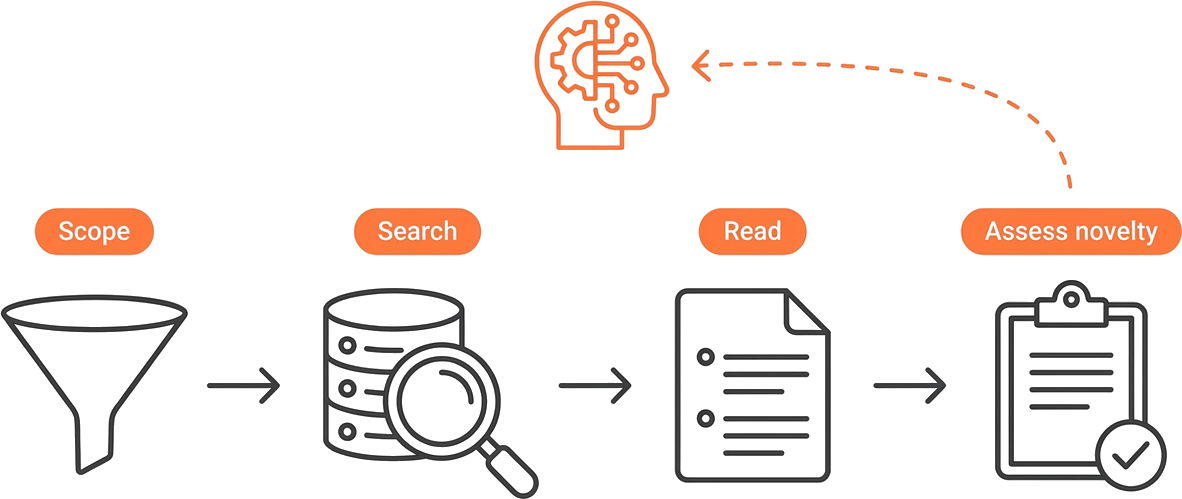
Scope the search (optional)
If the question needs a filtered scope, the agent resolves the filter values first. It calls lookup_classifications to turn a technology description into CPC/IPC codes, or lookup_party to turn a company name into the exact assignee string stored on patent records. Classification lookup is free; assignee lookup costs 1 credit. Both feed into the search_conditions filter on the next step.
Search the corpus
The agent calls semantic_patent_search with a natural language description. For an invention like a solid-state battery electrolyte using sulfide glass, it describes the technology in the query parameter and gets back ranked results with UCID, title, relevance score, and patent URL, all in a single call.
Read the top hits
It calls get_patent (or batch_get_patents for several at once) with sections=claims to read the claims of the most relevant results. Description and claims are truncated to 8,000 characters per section so they fit the AI’s context window.
Assess novelty
When you want a structured verdict, the agent calls generate_novelty_report with your invention description. This is the expensive step — at 720 credits it costs more than everything else in this walkthrough combined, so ask for it deliberately.
Because the agent holds every result in one conversation, you can interrupt at any step. After the search you can say “compare the top three to my idea” before committing to a full report.
When a publication number cannot be confirmed
Patent identity is not a safe place for an agent to guess. GoVeda normalizes supported formatting variants and known publication mappings, but it does not replace an unresolved reference with a similar-looking patent number. Instead, the patent tool returns UNRESOLVED_REFERENCE and directs the agent to the free discover_patent_references tool.
Discovery returns available publication candidates with titles, dates, and links for review. A candidate may be a different patent, so the agent should present the choices and continue only after you select one or explicitly authorize it to choose a likely match. If none is right, keep the original reference unresolved.
Handling async tools
Not every tool returns instantly, and the distinction matters in practice.
semantic_patent_search polls internally and returns final results in a single call, typically 5 to 15 seconds. prior_art_search and generate_novelty_report work differently: both return an ID immediately (search_id or report_id), and the agent polls a status tool until the work finishes. For a prior art search, it calls get_search_status with the search_id until the status reads completed, at which point the results are included in the response. For a report, get_report_status tracks progress through pending → searching → analyzing_query → analyzing_patents → analyzing_final → completed, then the agent calls get_report_summary for the verdict and get_report_patent_analysis to drill into specific patents.
A prior art search typically takes 3 to 5 minutes; a report takes 5 to 15 minutes. Most AI assistants handle the polling loop automatically, so you just see the final answer.
Keeping cost under control
Credits are the one thing an autonomous agent can spend on your behalf without a second prompt, so know the numbers before you let it loose.
| Operation | Credits |
|---|---|
| Patent search (10 results) | ~50 |
| Patent search (100 results) | ~320 |
| Prior art search (10 results) | ~690 |
| Patent content retrieval | 1 per patent |
| Novelty report | 720 |
| Status checks and usage | Free |
Prior art searches and reports are the expensive operations. Scope them in the prompt rather than leaving the choice to the agent.
In Claude, Cursor, and API-key clients the agent can check your balance via get_usage, which returns remaining credits, reserved credits held for in-progress operations, and billing period details. ChatGPT does not expose get_usage — check the Plan & Credits page instead. New users get a 14-day free trial with 10,000 credits automatically, activated the moment a request needs credits. Credits are shared with the GoVeda web app, so anything you spend through the agent draws from the same balance.
Example agent conversation
Here is what a short session looks like once the agent is doing the work:
You: Search for patents about solid-state battery electrolytes using sulfide glass
Assistant: (calls
semantic_patent_searchwith your query, returns 10 results with titles, UCIDs, and relevance scores)You: Get the full claims for the top result
Assistant: (calls
get_patentwith the UCID andsections=claims, then explains claim 1 in plain language)You: How many credits do I have left?
Assistant: (calls
get_usage, reports your balance)
You never name a tool. The agent reads each question, picks the right call, and keeps the thread of the investigation across turns.
Frequently Asked Questions
Which AI clients support this?
Any MCP-compatible client. The GoVeda docs cover Claude Desktop and claude.ai, ChatGPT, and Claude Code, and the server works with other clients that support Streamable HTTP transport. See the connection guide for the per-client steps.
Do I need to write code?
No. With an MCP client, you connect once and ask in plain language. The agent discovers the tools and fills in the parameters for you, so a patent investigation runs from a normal chat without any code.
Does the agent give legal advice?
No. Patentability reports generated through the MCP server are produced by AI and are for informational purposes only. They do not constitute legal advice, and you should have a qualified patent attorney or agent review them before any filing, licensing, or litigation decision.
How current is the patent data, and what does it cost to run?
The agent searches the same patent corpus and credit-shared account as the GoVeda web app. A typical investigation, a search plus reading a few patents, costs around 50 to 60 credits; a full novelty report costs 720. Status checks, classification lookup, patent-reference discovery, and balance checks are free.
Disclaimer: This article is for general informational purposes only and does not constitute legal advice. Patent law varies by jurisdiction and changes over time. For decisions about your specific situation, consult a qualified patent attorney or agent. GoVeda makes no warranty as to the accuracy or completeness of the information presented.