Advanced Filters
Semantic search ranks the entire 220M-patent corpus by relevance to your query. That’s powerful, but it’s not always what you want. Sometimes you only care about US filings from the last five years. Sometimes you want to limit results to a particular assignee. Sometimes you need a precise CPC classification scope.
Advanced filters let you constrain the candidate set before relevance ranking, so the top results are both relevant and in scope.
Open the filter dialog
The filter button sits next to the search input on the home page and on the search results page. Click it to open the Search Filters dialog (a side drawer on mobile).
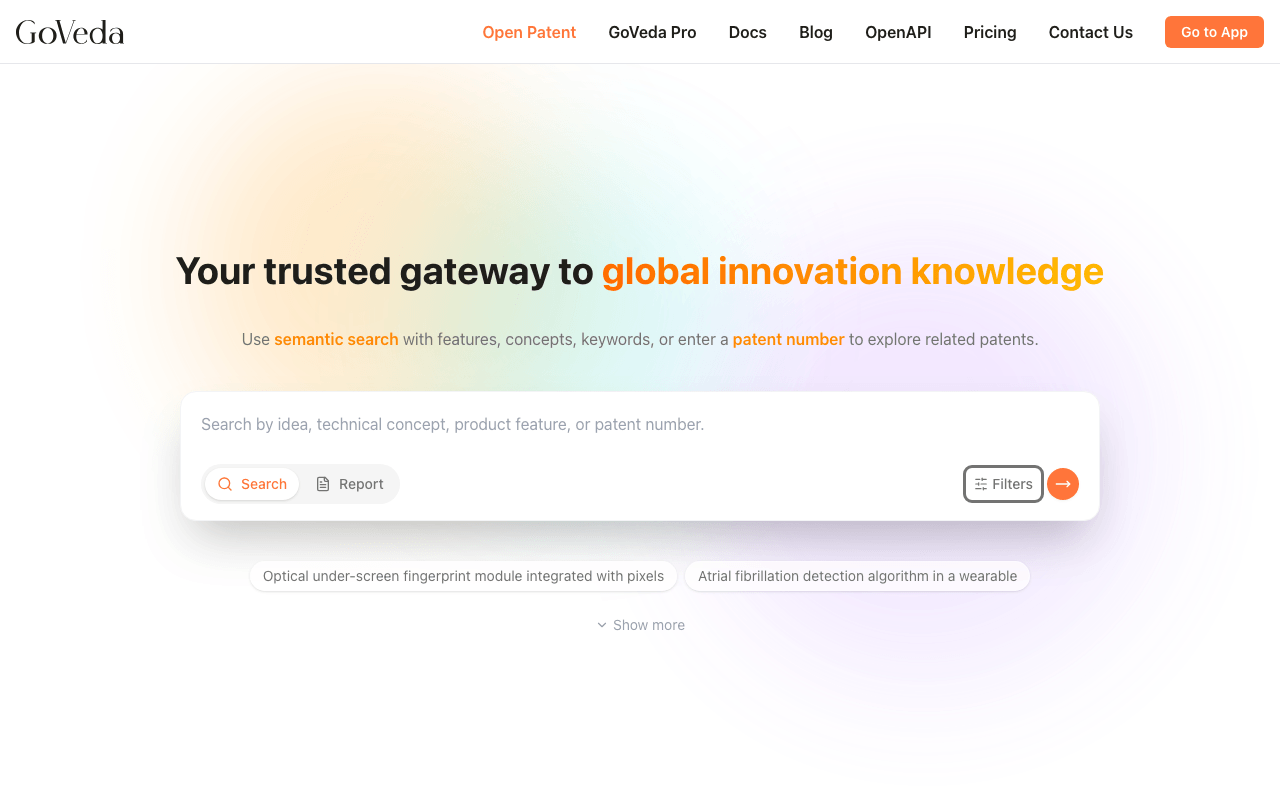
Filters apply to the current query, and the state lives in the URL. Share the URL and the recipient sees the same filters applied.
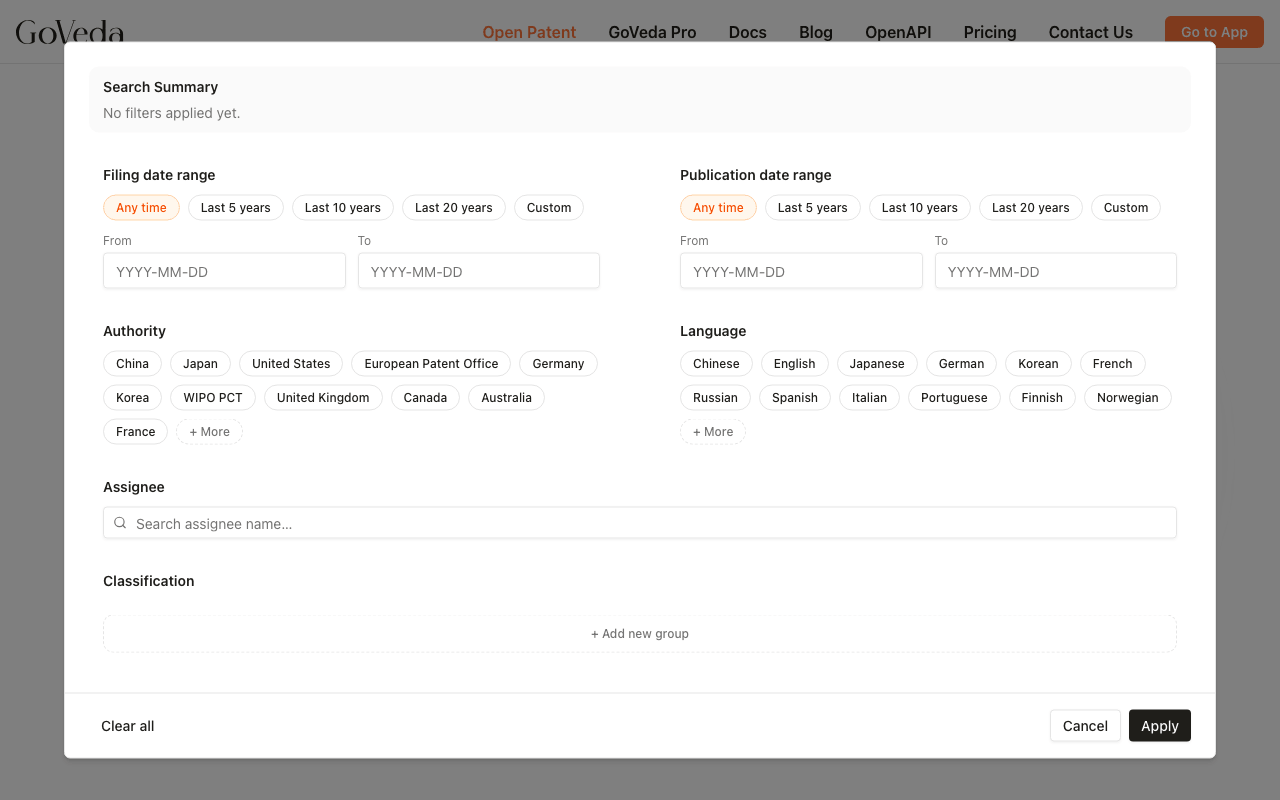
Available filters
The dialog groups filters into rows.
Date ranges
Two independent date filters:
- Filing date range. When the application was first filed.
- Publication date range. When the patent (or application) was published.
Each supports presets (Last year, Last 5 years, Last 10 years, etc.) and a custom range. Use filing date when you care about when the technology was invented; use publication date when you care about when it became public.
Authority
The patent office that granted or published the document (US, EP, CN, JP, KR, etc.). Multi-select.
The full list is data-driven from the underlying corpus. The most common authorities surface immediately. The More dropdown is searchable for less common ones.
Language
The language of the patent document. Use this when you want to limit results to documents you can read directly without translation, or when you want to expand into non-English filings deliberately.
Assignee
Filter by patent owner. The assignee field is standardized, but you don’t have to know the exact stored form. Type a company name in any script or spelling variation — Qualcomm, Qualcomm Inc., QUALCOMM INCORPORATED, or 高通 — and GoVeda resolves it to the canonical assignee name on patent records, then suggests matches. Pick from the suggestions to apply the filter.
For multi-entity corporate groups (parent + subsidiaries), the suggestion expands to include all known related entities so you can filter on the whole group with one click.
Legal status
Choose one or more current legal statuses: Pending, In force, Patented, Abandoned, Lapsed, Expired, or Revoked.
Use Alive only to select Pending, In force, and Patented together. Use Inactive only to select Abandoned, Lapsed, Expired, and Revoked. You can still select or clear individual statuses after using either shortcut.
Classifications (CPC / IPC)
The most powerful filter, and the one with a bit of a learning curve.
CPC and IPC codes are hierarchical taxonomies that classify patents by technology area; every patent gets one or more codes. Filtering on classifications is how you precisely scope a search to “wireless charging” or “lithium-ion batteries” without depending on the words used in the patent text.
Classifications are organized into groups:
- Within a group, items combine with AND or OR (your choice per group).
- Between groups, groups combine with AND or OR (one connector for all groups).
This lets you express things like:
(H02J 50/00 OR H02J 50/10) AND (Y10S 903/903)
Click Add classification group to create a new group. The transfer-box editor lets you browse the CPC/IPC hierarchy and pick codes. Within a group, you can pick the operator (AND when you want patents that touch every code, OR when you want patents that touch any).
Apply, clear, share
The dialog footer has three actions:
- Clear all. Reset every filter.
- Cancel. Close without applying changes.
- Apply (or Re-search if you changed the query too). Commit the filters and refresh results.
Once applied, the active filter values appear in a Search Summary card above the results, with labeled lines like Authority: US, EP, Legal Status: Pending, In force, and Classification: (H02J 50/00 OR H02J 50/10). To change them, click the Filters button on the summary card to re-open this dialog, edit, and re-search.
The full filter state is in the URL. Bookmark a filtered search, or paste the URL into a teammate’s chat. They’ll see exactly what you see.
Tips
Start broad, then filter. Run the search first with no filters to see what’s there. Then add filters to narrow toward what you actually want. If you over-filter from the start, you might miss relevant patents whose metadata doesn’t match your assumptions.
Authority + date is a good first cut. “US filings from the last 5 years” eliminates a lot of noise for most product-focused searches.
Classifications need calibration. Run a short search first to see which CPC codes show up among the top hits. Use those as the seed for your classification filter.
Use OR within a group when codes are siblings. H02J 50/05 OR H02J 50/10 both belong to wireless power transmission. Use AND when you want a precise intersection of two technology aspects (e.g., wireless power AND vehicle charging).
Assignee filters are exact. If your filter returns nothing for a company you know files a lot, you probably need to look up the canonical name first. Check the suggestions in the assignee picker, or use the lookup_party tool via the MCP server.
Same filters via API and MCP
The same filter system is available programmatically through the Patent MCP Server. See the search_conditions parameter on semantic_patent_search and prior_art_search. The web UI’s filter state translates 1-to-1 to the MCP search_conditions schema.