Patent Search for AI Assistants: Why Connect an MCP Server
Ask an AI assistant about a patent and you will get a confident answer. The trouble is you cannot tell whether it is real. GoVeda’s Patent MCP server fixes that by giving your assistant live tools that hit actual patent data, so the answer is grounded in real records instead of the model’s memory. This post is the case for why patent research belongs inside your AI assistant in the first place, and why GoVeda is the server worth connecting.
The problem with asking an AI about patents
A language model is trained on a frozen snapshot of text. It has no live connection to a patent register, no current index, and no way to confirm whether a publication number, an assignee, or a legal status is correct. So when you ask about a specific patent, it does one of two things. It tells you it cannot be sure, or it invents something that reads like a patent and is not one. For most chatbot tasks a plausible answer is fine. For patent work it is a liability.
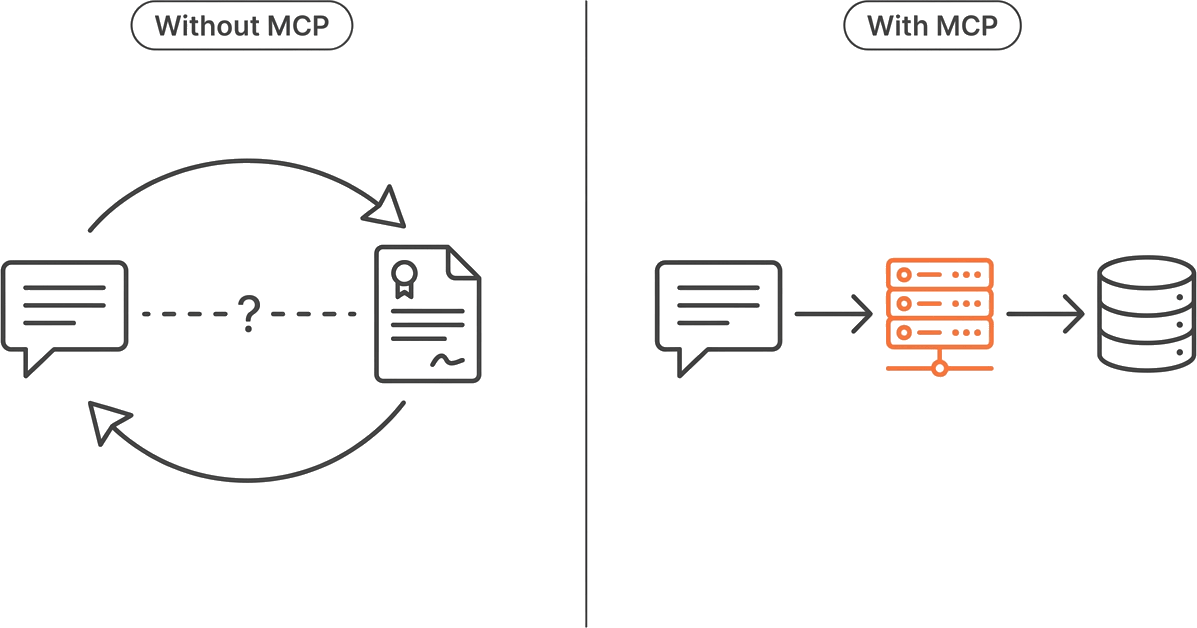
The usual workaround is to keep two windows open. You research in a patent database, copy a claim or an abstract into the chatbot, ask it to explain, then carry the answer back to take the next step. Every round trip drops context. The assistant never sees the search that produced the result; the model only knows the fragment you pasted. You become the integration layer, shuttling text back and forth and holding the whole investigation in your head.
That is the gap an MCP server closes. (New to the term? Start with What Is an MCP Server?)
The fix: give the assistant real tools
The Model Context Protocol lets an AI client call external tools through one standard interface. Connect a patent MCP server and your assistant stops guessing. It calls a search tool, reads the result, calls a content tool to pull the claims, and reasons over data that came back from the live service this turn, not from training. The model still does what it is good at, understanding your question and explaining the findings in plain language. The server does what the model cannot. It reaches live, current patent data on demand.
The payoff is that the entire investigation stays in one conversation. You ask, the assistant searches, you say “compare the top three to my idea,” and it already holds the search results, the claims it retrieved, and your original question in the same thread. Nothing gets pasted. Nothing gets lost between windows.
Why GoVeda’s Patent MCP server
Plenty of things can be wrapped in an MCP server. What makes one worth connecting is the depth of what sits behind it. GoVeda exposes 22 customer-facing tools over a single endpoint, and they cover a real patent investigation end to end:
- Semantic search across 220M+ global patents. Describe a technology or an invention in plain language and get ranked matches. No keyword guessing.
- Full patent content by section. Pull the abstract, claims, description, dates, parties, classifications, legal status, and family for one patent or many at once.
- Reference-safe retrieval. Normalizes supported publication-number formats and returns reviewable candidates when a reference cannot be confirmed instead of silently replacing it with a similar-looking patent.
- Citations, attachments, and transfers. Backward and forward citations including non-patent literature, the document’s PDF and drawing attachments, and the ownership and assignment history.
- Stored translations. Retrieve the multilingual text variants a patent carries in the corpus.
- Prior art and AI reports. Run a prior art search against a known patent, or generate a novelty and patentability assessment from an invention description.
You never call these by name. Your assistant discovers them and picks the right one from what you ask. The tools are the same in every client.
A few things set the GoVeda server apart from a thin wrapper around a search box:
Depth, not just search. Most patent integrations stop at returning a list of hits. GoVeda goes from the first search through reading claims, tracing citations, and checking who owns what, all the way to a structured novelty read, every step callable inside the same conversation.
Credits shared with the web app. The server runs on the same GoVeda account and the same credit balance as the web application . Work you do in your assistant draws from one pool, so you are not buying a separate subscription to put patents in your chat. A search of ten results costs about 50 credits, full content is 1 credit per patent, a prior art search runs about 690, and a novelty report is 720. Status checks, classification lookup, patent-reference discovery, and balance checks are free; assignee and portfolio lookups cost 1 credit per call or page.
A real free trial. New accounts get a 14-day free trial with 10,000 credits — enough to run several searches, read a stack of patents, and try a report before deciding. It starts itself the first time a request needs credits; there is no activation step in any client.
Cross-language strength
Patents are global, and prior art does not arrive in your language. GoVeda’s semantic search matches by meaning rather than keyword. You can search in any language, and the results can include patents originally filed in other languages. The matches come back as they sit in the corpus, in their original language. You are not stuck reading them that way, though.
In the GoVeda web app, the patent detail page can translate a patent into your interface language on demand, so a Chinese or Japanese filing becomes readable without leaving the page. AI reports return in the language you have selected. Through the MCP server, the get_patent_translations tool returns the language variants a patent already carries in the corpus. You match by meaning, translate on demand in the app, and read reports in your language, so the filing language stops being a wall.
Who it is for, and when to reach for it
This is for anyone who already lives in an AI assistant and treats patents as part of the work, not a once-a-year errand. Inventors and founders sizing up whether an idea is already taken. Product and R&D teams scanning a field before they build. People doing a first-pass novelty or prior art read before bringing in counsel.
Reach for it when you want the research to happen where you are already thinking, without a tab switch, and when you need the answer grounded in real data instead of a confident guess. It does not replace a patent attorney, and the AI reports are a starting point, not a legal opinion. What it replaces is the copy-paste shuffle between a chatbot and a patent site.
It works in any MCP client: Claude, ChatGPT, Claude Code, and others. The capabilities are identical wherever you connect; only the setup step differs.
Getting started
The whole thing comes down to adding one endpoint, https://mcp.goveda.com/mcp, to your client and signing in once through OAuth in the browser. From there:
- For how to pick a client and connect it, see Patent Search Across MCP Clients.
- For composing the tools into a real research workflow, see Build an AI Patent Research Agent.
- For the full tool list, credits, and setup steps, see the Patent MCP Server docs.
Frequently Asked Questions
Why not just ask ChatGPT or Claude about a patent directly?
Because the model has no live access to patent data. It answers from a frozen training snapshot and can fabricate publication numbers, assignees, or legal status that look correct but are not. Connecting the GoVeda MCP server means the assistant calls real tools against the corpus, so the answer is grounded in live data rather than the model’s memory.
Do I need to write code or pay for a separate plan?
No. You add one endpoint to an MCP client and sign in through the browser. The server runs on credits shared with the GoVeda web app, and new accounts get a 14-day free trial with 10,000 credits automatically on first use, so there is no separate subscription to put patents in your assistant.
Which AI assistants can connect?
Any MCP-compatible client, including Claude, ChatGPT, Claude Code, and other editors or agents that speak the protocol over HTTP. The tools are the same everywhere; only how you connect changes from one client to the next.
Can it handle patents in other languages?
Yes. Semantic search matches by meaning, so a query surfaces relevant patents regardless of the language they were filed in. In the web app, the patent detail page can translate a patent into your interface language on demand, and AI reports come back in the language you have selected.
Disclaimer: This article is for general informational purposes only and does not constitute legal advice. Patent law varies by jurisdiction and changes over time. For decisions about your specific situation, consult a qualified patent attorney or agent. GoVeda makes no warranty as to the accuracy or completeness of the information presented.