What Is an MCP Server? Patent Search, Explained
An MCP server grants an AI assistant access to tools and data it can’t reach on its own. Think of it as a program that offers specific capabilities, like searching or retrieving documents, for AI clients to use. Patent search serves as a great example to illustrate its importance.
What is the Model Context Protocol (MCP)?
The Model Context Protocol is an open standard connecting AI assistants to external tools and data sources via a single, uniform interface. You can find its complete specification at modelcontextprotocol.io . By standardizing how applications provide context to large language models, it simplifies the integration process. Before MCP, each tool required a custom integration for every AI assistant. Now, a tool provider writes one MCP server, and any compatible client can use it. An assistant supports MCP once and gains access to every MCP server available.
This protocol defines the interaction between client and server, determining how they communicate and utilize each other’s capabilities.
What is an MCP server, exactly?
An MCP server represents one half of the protocol agreement. It offers a set of tools and resources an AI client can discover and use during interactions. The server tackles specialized tasks like running searches, fetching documents, or generating reports, then returns the results to the client.
On the other side, the client, whether it’s Claude, ChatGPT, or another assistant, manages the conversation and determines when to leverage the server. You communicate in plain language with the client, and it converses in protocol with the server.
Much like a USB-C port, which accepts any compatible device, an MCP server acts as that device. Connect a patent server and your assistant can search patents; switch to another server, and it performs different tasks without altering the assistant.
Why an AI model can’t just “know” patents
A large language model is trained on a fixed snapshot of text, freezing its knowledge upon completion. It lacks live access to patent registers, current indexes, or ways to verify patent details. Ask it about a specific patent, and it might generate incorrect information, a phenomenon known as hallucination, which is problematic for patent work.
Patent research demands current, authoritative, document-based data. New patents emerge continuously across jurisdictions, making static memory outdated. Legal status, family relationships, claims, and citations require live, accurate sources. Here, the MCP server bridges the gap, with the model understanding language and the server providing up-to-date data.
What a patent MCP server provides
GoVeda’s patent MCP server exemplifies this setup. Once connected, the assistant can access patent tools within the conversation. Results rely on real patent data, not just the model’s memory. The Patent MCP Server docs outline its capabilities:
- Semantic searches across over 220 million global patents
- Retrieval of full patent content, including legal statuses
- Generation of novelty and patentability assessment reports
- Credit balance checks
This division of tasks is key. You describe your invention, the model interprets it, and the server handles the data search. The model then explains the findings in everyday terms. Together, they accomplish what neither could alone.
MCP server vs plugin vs REST API
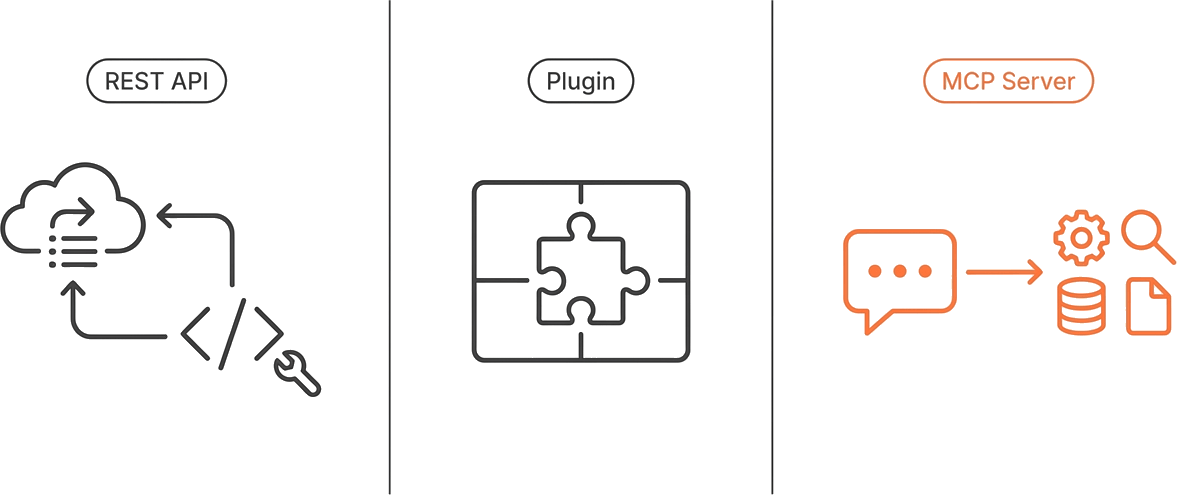
Plugins and REST APIs both predate MCP, but they connect assistants to external data differently.
Plugins are typically platform-specific and follow strict rules. REST APIs offer flexibility but require you to write client code. MCP merges these advantages. It is open like a REST API, yet includes built-in protocols allowing an assistant to discover and use tools without coding.
How to try a patent MCP server
Trying it out is straightforward. In an MCP client like Claude or ChatGPT, add the GoVeda Patent connector with the endpoint https://mcp.goveda.com/mcp, sign in through the browser window, and ask your patent question. The assistant automatically identifies available tools and uses them as needed. For detailed setup guides, visit Patent search MCP clients, or for a complete research walkthrough, see Building a patent research agent with MCP.
Frequently Asked Questions
Who created MCP? MCP is an open protocol with a public specification. You can read the standard and its documentation at modelcontextprotocol.io .
Is MCP only for Claude? No. MCP is a standard, so any MCP-compatible client can use any MCP server. Claude, ChatGPT, IDE assistants, and coding agents can all act as clients.
Do I need to code to use an MCP server? No. If you are using an MCP client, you add the server’s endpoint, sign in, and ask questions in plain language. Writing code only comes up if you are building your own client or your own server.
Is a patent MCP server free? GoVeda’s server runs on credits shared with the GoVeda web app, and new users get a free trial automatically on their first request that needs credits. See the Patent MCP Server docs for current details on credits and the trial.
How is an MCP server different from an API? A REST API exposes data and expects you to write client code to consume it. An MCP server exposes tools an AI client can discover and call on its own, with no integration code required from you.
Disclaimer: This article is for general informational purposes only and does not constitute legal advice. Patent law varies by jurisdiction and changes over time. For decisions about your specific situation, consult a qualified patent attorney or agent. GoVeda makes no warranty as to the accuracy or completeness of the information presented.