You’ll need the GoVeda MCP server connected first. It takes about a minute. See Connect to Claude or ChatGPT to set it up. Once it’s connected, just ask your question; your assistant reaches for GoVeda on its own when a patent task needs it. New accounts get a 14-day free trial with 10,000 credits.
Classification codes are how patent offices file inventions, and a precise search leans on the right ones. You don’t have to memorize the CPC scheme. Describe the technology and let GoVeda find the codes for you.
The prompt
Open a new chat and paste:
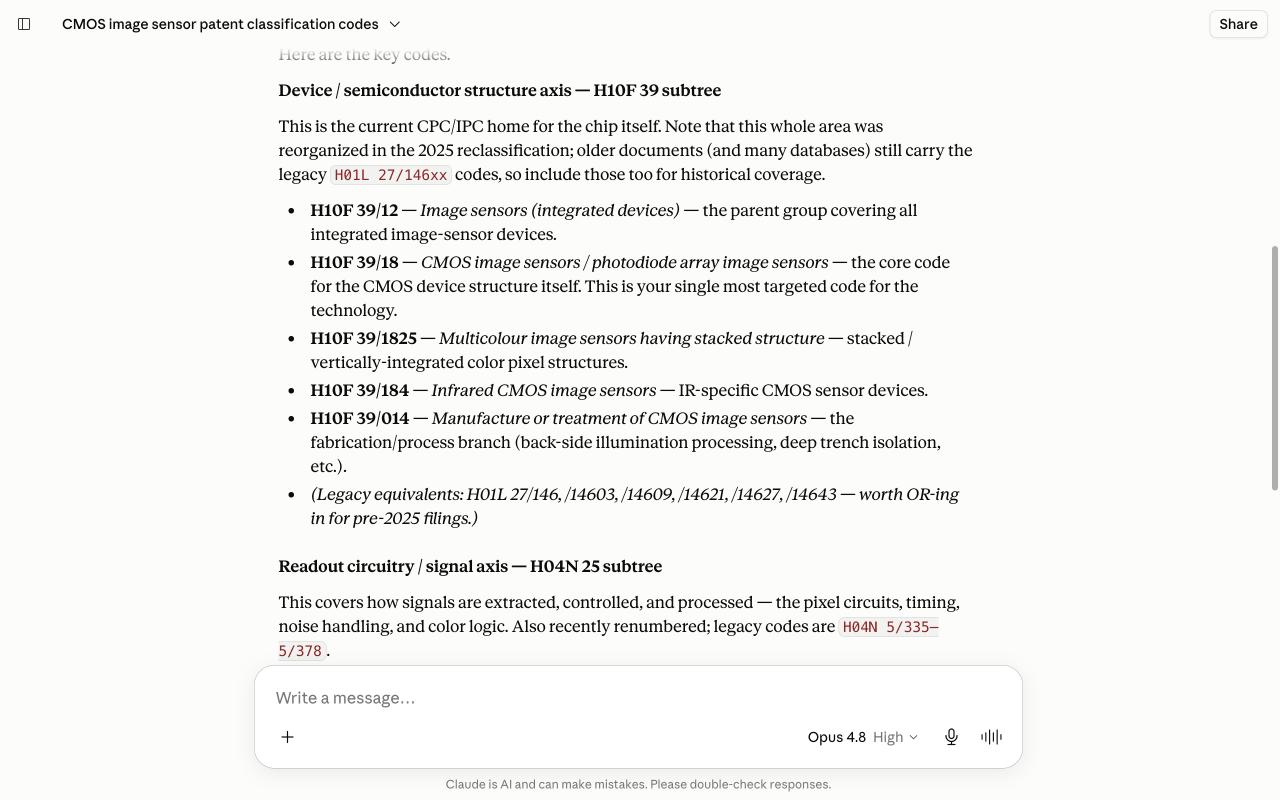
I want to search patents on CMOS image sensors but I’m not sure which classification codes to use. What are the most relevant CPC/IPC codes for this technology? List the key ones and explain what each covers, so I can use them to filter a precise search.
What GoVeda does behind the scenes
One classification lookup rarely covers a whole technology, so the assistant queries it from a few angles and merges the results:
Look up the device structure
It calls lookup_classifications for the sensor hardware itself, which surfaces the device-structure codes (the H10F 39/18 family).
Look up the readout circuitry
It runs the same tool again for the signal and readout side, which lands on the circuitry codes (H04N 25). Different angle, different bucket.
Look up the optics
A third pass covers the optical path (color filters, microlenses), so the final list spans the full sensor stack rather than one slice of it.
What you get
GoVeda returns the codes that actually matter, grouped by angle, each with a plain-English description of what it covers. It even flags when a subclass has been recently reorganized, so you don’t search against a retired code.
Tips
Once you have the codes, feed them straight into a filtered search. Ask GoVeda to find patents in a technology area and restrict to those classifications, and you get far cleaner results than keywords alone.
Next: browse more use cases or read the MCP tool reference.