Patent Search by Company: Find the Patents a Company Owns
A lot of patent work starts from a company, not a concept. You want to see everything a competitor owns, map a corporate group’s holdings before a deal, or audit your own portfolio. The question is not “patents about X,” it is “every patent company Y holds.” That is not a topic search at all. It is portfolio enumeration, and it works differently.
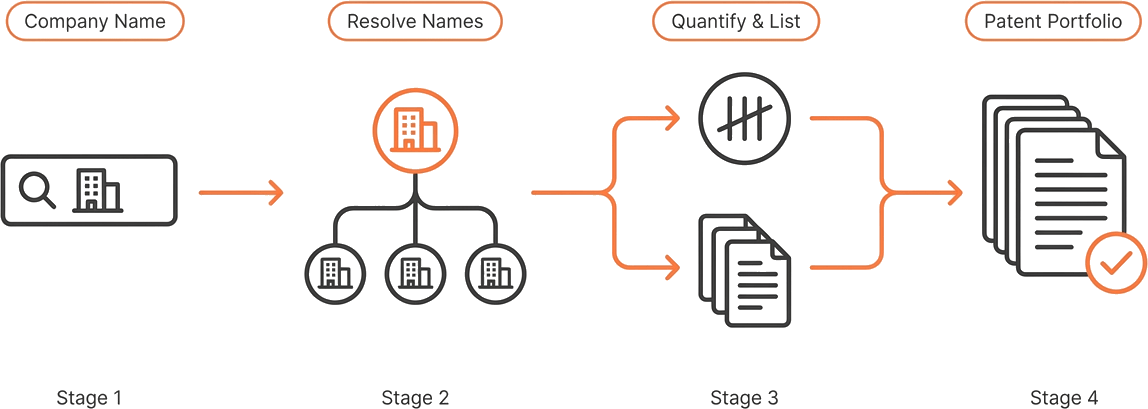
GoVeda has two dedicated tools for exactly this job. party_patents lists every patent on record for an assignee, and party_count counts them. Through MCP or the REST API, each call or page costs 1 credit; neither needs a query, and both return results by company rather than by relevance. This post walks the workflow end to end: resolve the company name, size the portfolio, list it, and scope it down. The same steps run in the GoVeda web app or from an AI assistant over the MCP server, while the web app shows its own price before a paid action.
Why is company patent search harder than it looks?
The obstacle is the company name itself. Patent records do not store a clean, standardized owner. The same company shows up as Qualcomm, Qualcomm Inc., and QUALCOMM INCORPORATED across different filings, and only one canonical form exists in the index. Type the wrong variant and you get zero results, with no error to tell you the name was the problem.
It gets worse for large organizations. They file under subsidiaries, regional entities, and the names of companies they have acquired. A search for the parent alone misses everything held by the children. Guessing the assignee string by hand almost always returns a fraction of the real portfolio, silently, which is exactly the failure you would never notice until it mattered.
So the workflow does not start with the list. It starts with getting the name right.
Step 1 — Resolve the company name (lookup_party)
lookup_party turns a free-text company name into the canonical assignee form actually stored on patent records. Pass Qualcomm and it returns up to ten ranked matches, each with the exact stored name you will use downstream. This is the make-or-break step: every tool that follows matches names exactly, including casing, so an unresolved name produces an empty result rather than a partial one.
For a corporate group, set expand_hierarchy=true. The response then includes the ultimate parent and its subsidiaries under all_names, so you can pass the whole list as one portfolio. Hierarchy expansion is available for entities in a curated dictionary (largely Russell 3000, S&P 500, Nikkei 225, and DAX 40 members); for others, the relationship fields come back null, and you supply known variants yourself.
The same resolution underpins the assignee filter described in Filter Patent Searches by Date, Jurisdiction & Assignee. Resolve once, reuse everywhere.
Step 2 — Size it first (party_count)
Before you list anything, count it. party_count takes the resolved names (1 to 50, case-sensitive) and returns, per name, whether it exists and how many patents it holds, plus a deduped total across the whole list. The total is a union: a patent held jointly by two of the listed names counts once, not twice, so it is a true portfolio size rather than a sum of overlapping buckets.
It is deterministic. No language model, no web call; the same input always returns the same number. That makes it the right tool for two jobs. First, a sanity check: if a name you expected to be large comes back with exists: false, you resolved it wrong, and you fix that before wasting a listing call. Second, comparison: pass several companies at once and read their sizes side by side. Add breakdown=authority to see the count split by patent office.
Step 3 — List the portfolio (party_patents)
Once the names check out, party_patents enumerates the portfolio. It returns the patents held by the assignee names in publication-date-descending order, as a clean paginated list. It is synchronous, with no task to submit or poll. Through MCP or the REST API, each page costs 1 credit.
Each item carries the publication_number, the filing and publication dates, the authority, patent_status, language, current_assignees, and IPC/CPC classifications. It does not include the title or any body text; the list is built for enumeration, not reading. To pull full content for any entry, hand its publication_number to get_patent, which retrieves the abstract, claims, description, and the rest on demand.
Pagination is cursor-based. The default page is 100 patents (200 max); the response includes a next cursor, which you pass back to fetch the following page. When next comes back null, you have reached the end of the portfolio.
Step 4 — How do you narrow a portfolio (search_conditions)?
A full portfolio is often more than you want. Both party_count and party_patents accept the same search_conditions JSON used by GoVeda’s topic search, so you can scope the list by date, jurisdiction, classification, or legal status without leaving the company view.
To pull the live US patents held by a corporate group, combine the resolved all_names with a status and an authority condition:
{
  "operator": "and",
  "conditions": [
    { "field": "current_assignees", "operator": "in", "value": ["Qualcomm Inc", "Qualcomm Technologies, Inc."] },
    { "field": "patent_status", "operator": "eq", "value": "alive" },
    { "field": "authority", "operator": "in", "value": ["US"] }
  ]
}
The same condition narrows the count and the list identically, so a filtered party_count and a filtered party_patents agree. For the complete field and operator reference, see the filter guide; this post does not repeat the schema.
Portfolio retrieval vs. topic search with a company filter — which do you use?
These two workflows answer different questions, and choosing the wrong one wastes effort. Portfolio retrieval enumerates a company’s holdings with no topic. A topic search with an assignee filter ranks patents about a subject and keeps only those a company owns. Use this table to pick.
| Your question | Tool | Sorted by | Use it for |
|---|---|---|---|
| ”Every patent company Y owns” | party_patents / party_count | Publication date | Portfolio audit, deal due diligence, seeding a competitor map |
| ”Patents about X owned by company Y” | semantic_patent_search + assignee filter | Relevance to X | Targeted prior art, freedom-to-operate within a topic |
Reach for party_patents when the company is the whole question, and for a filtered semantic search when a topic is the question and the company just scopes it.
Where can you run a company patent search?
In the GoVeda web app, the assignee search surface resolves a company name and returns its portfolio interactively. From an AI assistant connected to the Patent MCP Server, the same lookup_party, party_count, and party_patents tools run in conversation, the way an AI patent research agent chains them. The behavior is the same either way. For every parameter and default, see the tool reference.
Frequently Asked Questions
How do I find every patent a company owns?
Resolve the company name to its standardized assignee form with lookup_party, then pass that name (or names) to party_patents, which lists every patent on record for that assignee, paginated. Use party_count first if you only need the size of the portfolio.
What if the company files under several names or has subsidiaries?
Set expand_hierarchy=true on lookup_party to get the parent and its subsidiaries under all_names, then pass the whole list to party_patents or party_count. Listing a company’s stored name variants together merges their portfolios into one count and one list.
How is this different from searching by topic and filtering by company?
A filtered topic search answers “patents about X owned by company Y” and ranks by relevance to X. Company portfolio retrieval answers “every patent owned by company Y” with no topic at all, returned by publication date. Use party_patents for the whole portfolio and the assignee filter when you want topic-relevant matches within it.
Does patent search by company cost credits?
Through MCP or the REST API, each lookup_party or party_count operation costs 1 credit, and each party_patents page costs 1 credit. The web app shows its own price before a paid action.
Does it return absolutely every patent a company has ever filed?
It returns every patent on record under the assignee names you supply, which is why name resolution and hierarchy expansion matter. Coverage depends on how filings are assigned and recorded across offices, so treat the result as a thorough portfolio view rather than a guaranteed-complete legal record. For filing or ownership decisions, confirm with official register data and a qualified professional.
Disclaimer: This article is for general informational purposes only and does not constitute legal advice. Patent law varies by jurisdiction and changes over time. For decisions about your specific situation, consult a qualified patent attorney or agent. GoVeda makes no warranty as to the accuracy or completeness of the information presented.