Filter Patent Searches by Date, Jurisdiction & Assignee
A semantic search across GoVeda’s 220 million+ patent corpus is built for discovery: describe a technology and the closest matches come back. But a lot of real patent work starts from a name, not a concept. You want every active patent a competitor holds in the US, or the filings a corporate group made in a given CPC area since 2020. For that, you filter.
The most common job is the company search: pull a competitor’s portfolio, then layer date, jurisdiction, classification, or legal status on top to scope it down. If you are checking for live US rights held by a rival, an expired Japanese filing from 1998 is just noise, and a filter removes it.
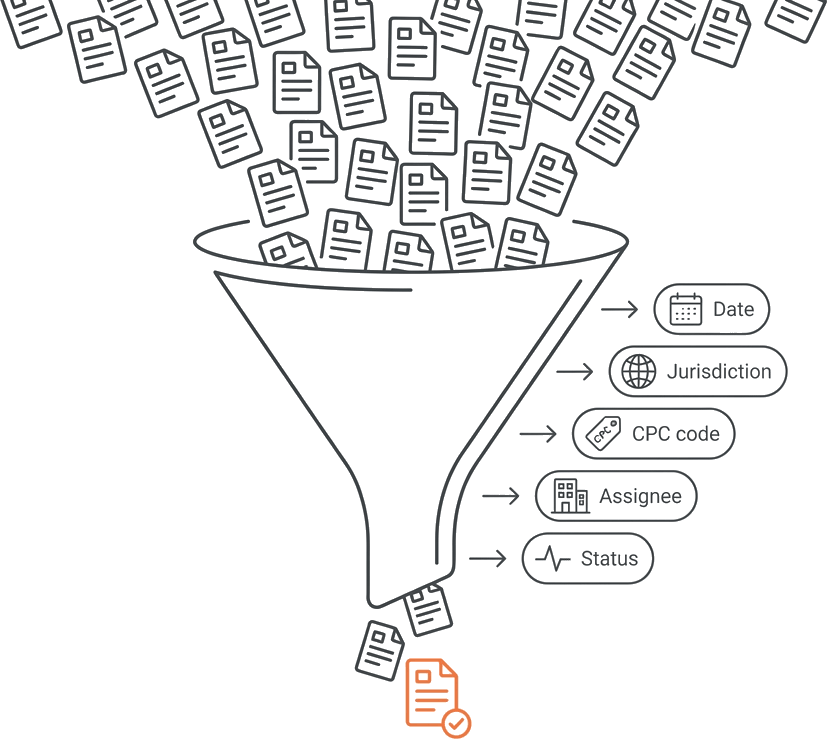
GoVeda’s filters let you narrow any search by company (assignee), date, jurisdiction, classification, and legal status through the search_conditions parameter. The same syntax applies to both semantic_patent_search and prior_art_search, and it works the same in the GoVeda web app or from an AI assistant connected over the MCP server. The assignee filter is the centerpiece of most company searches, so it gets its own section below.
The search_conditions structure
search_conditions operates as a JSON string. At its core, there’s an operator (and or or) and a conditions array. Each condition includes a field, an operator, and a value.
{
  "operator": "and" | "or",
  "conditions": [
    { "field": "<name>", "operator": "<op>", "value": <value> }
  ]
}
You can nest conditions, using another { operator, conditions } block instead of a { field, operator, value } leaf. This allows for complex logic like “in this CPC area AND (assigned to company A OR company B).” However, most searches use a simple top-level and with a straightforward list of conditions.
Pass the entire string. If building in code, use JSON.stringify (or your language’s equivalent) to serialize your object before assigning it to the parameter.
Supported fields and operators
Here’s what you can filter. Use the field names and operators exactly as shown. Anything outside this table isn’t filterable.
| Field | Operators | Value |
|---|---|---|
filing_date, publication_date, expiration_date | gte, lte, gt, lt, between | YYYYMMDD string (or [from, to] for between) |
authority, language | in, not_in | List of codes, e.g. ["US", "EP"] |
cpc_codes, ipc_codes | in, not_in, contains, not_contains | List of classification symbols |
current_assignees | in, not_in, contains, not_contains | List of standardized company names (current owner) |
original_assignees | in, not_in, contains, not_contains | List of standardized company names (owner at filing) |
patent_status | eq | "alive" or "dead" |
Below are examples for each field group.
Filter patent searches by date
Dates are formatted as YYYYMMDD strings. Use gte, lte, gt, and lt for open-ended ranges. between works for a specific window with a [from, to] array.
For patents published since 2020:
{
  "operator": "and",
  "conditions": [
    { "field": "publication_date", "operator": "gte", "value": "20200101" }
  ]
}
To specify a filing window, try between:
{
  "operator": "and",
  "conditions": [
    { "field": "filing_date", "operator": "between", "value": ["20180101", "20201231"] }
  ]
}
Choose filing_date for priority, publication_date for disclosure, or expiration_date for term, depending on your needs.
Filter by jurisdiction and language
authority filters by the issuing patent office, using codes like US for the United States and EP for the European Patent Office. The language field takes a list of language codes. Both accept in and not_in.
To focus on US and European patents:
{
  "operator": "and",
  "conditions": [
    { "field": "authority", "operator": "in", "value": ["US", "EP"] }
  ]
}
Use not_in on either field to exclude codes instead of allow-listing them.
Filter by classification (CPC/IPC)
cpc_codes and ipc_codes filter by classification symbol and offer in, not_in, contains, and not_contains options.
Determining the correct symbol is vital. The classification system contains thousands of entries. Use lookup_classifications first, input a keyword, technology description, or partial symbol to get ranked classifications. Then, use the symbols it provides in your filter:
{
  "operator": "and",
  "conditions": [
    { "field": "cpc_codes", "operator": "in", "value": ["H01L"] }
  ]
}
Skipping lookup_classifications is risky. Ensuring the right symbol before searching means more accurate filters and reduces the chance of missing relevant patents.
Filter by assignee, resolve the name first
This is the trickiest filter. The current_assignees filter, which matches the patent’s current owner, demands an exact-string match with the canonical name on the record. Use original_assignees instead to match the owner at filing time, before any reassignment. Either way, variants like Qualcomm, Qualcomm Inc., and QUALCOMM INCORPORATED aren’t interchangeable. Use the wrong form, and you’ll get zero results without any errors.
Always run lookup_party first. Enter a free-text company name, and it will resolve to the canonical name used on patent records. Then, use this resolved name in your filter:
{
  "operator": "and",
  "conditions": [
    { "field": "current_assignees", "operator": "in", "value": ["Qualcomm Inc"] }
  ]
}
For larger companies, set expand_hierarchy=true on lookup_party to retrieve the parent company and subsidiaries under all_names. Pass this list to cover the whole corporate group.
If you want a company’s entire portfolio rather than the topic-relevant matches within it, skip the filtered search and use the dedicated party_patents and party_count tools, which list and count every patent an assignee holds with no query at all. See Patent Search by Company for that workflow.
Note: There isn’t an equivalent for inventors. Due to variations in transliteration and spelling, filtering by inventor name is unreliable. Instead, track inventors by their associated assignee.
Filter by legal status
patent_status uses eq with "alive" or "dead". For freedom-to-operate searches, you’ll usually want "alive", since expired rights don’t restrict you:
{
  "operator": "and",
  "conditions": [
    { "field": "patent_status", "operator": "eq", "value": "alive" }
  ]
}
Switch to "dead" to find patents no longer in force.
Combining filters: full examples
Real searches often combine conditions with and. For example, a search for US and European patents published since 2020 in CPC area H01L would look like this:
{
  "operator": "and",
  "conditions": [
    { "field": "authority", "operator": "in", "value": ["US", "EP"] },
    { "field": "publication_date", "operator": "gte", "value": "20200101" },
    { "field": "cpc_codes", "operator": "in", "value": ["H01L"] }
  ]
}
And to search for in-force patents across a corporate group, using the all_names list from lookup_party:
{
  "operator": "and",
  "conditions": [
    { "field": "current_assignees", "operator": "in", "value": ["Qualcomm Inc", "Qualcomm Technologies, Inc.", "Qualcomm Atheros, Inc."] },
    { "field": "patent_status", "operator": "eq", "value": "alive" }
  ]
}
These are passed as the search_conditions string on semantic_patent_search or prior_art_search with your query. The query determines relevance; filters decide which patents can be ranked.
Frequently Asked Questions
Can I filter by inventor?
No. There is no inventors field. Inventor names vary too widely across transliterations, diacritics, name order, and abbreviations to match reliably, and there is no inventor-suggest mechanism. Filter by the assignee the inventor files under instead.
Why isn’t my assignee filter matching anything?
The current_assignees and original_assignees filters are an exact-string match, and only one canonical form of each name exists in the index. Run lookup_party to get the correct standardized name, and use expand_hierarchy=true with the returned all_names list to cover a whole corporate group.
What date format do the date fields expect?
A YYYYMMDD string, for example "20200101". For between, pass a [from, to] array of two such strings.
Do filters cost extra credits?
Filtering does not change the cost of the underlying search. Through MCP, lookup_classifications is free and lookup_party costs 1 credit per call; the REST party-suggestion endpoint also costs 1 API credit per request.
Where can I use these filters?
The same search_conditions JSON works in the GoVeda web app’s search dialog and through the Patent MCP Server when you drive search from an AI assistant. The filter syntax in this guide is identical either way.
The full schema lives in the Patent MCP Server tool reference, and the Advanced Filters page covers the same filters in the GoVeda web app.
Disclaimer: This article is for general informational purposes only and does not constitute legal advice. Patent law varies by jurisdiction and changes over time. For decisions about your specific situation, consult a qualified patent attorney or agent. GoVeda makes no warranty as to the accuracy or completeness of the information presented.