You’ll need the GoVeda MCP server connected first. It takes about a minute. See Connect to Claude or ChatGPT to set it up. Once it’s connected, just ask your question; your assistant reaches for GoVeda on its own when a patent task needs it. New accounts get a 14-day free trial with 10,000 credits.
A single publication is usually just one country’s copy of an invention that’s been filed in many. To see the whole footprint, where else it exists and what’s still in force, ask for its family.
The prompt
Open a new chat and paste:
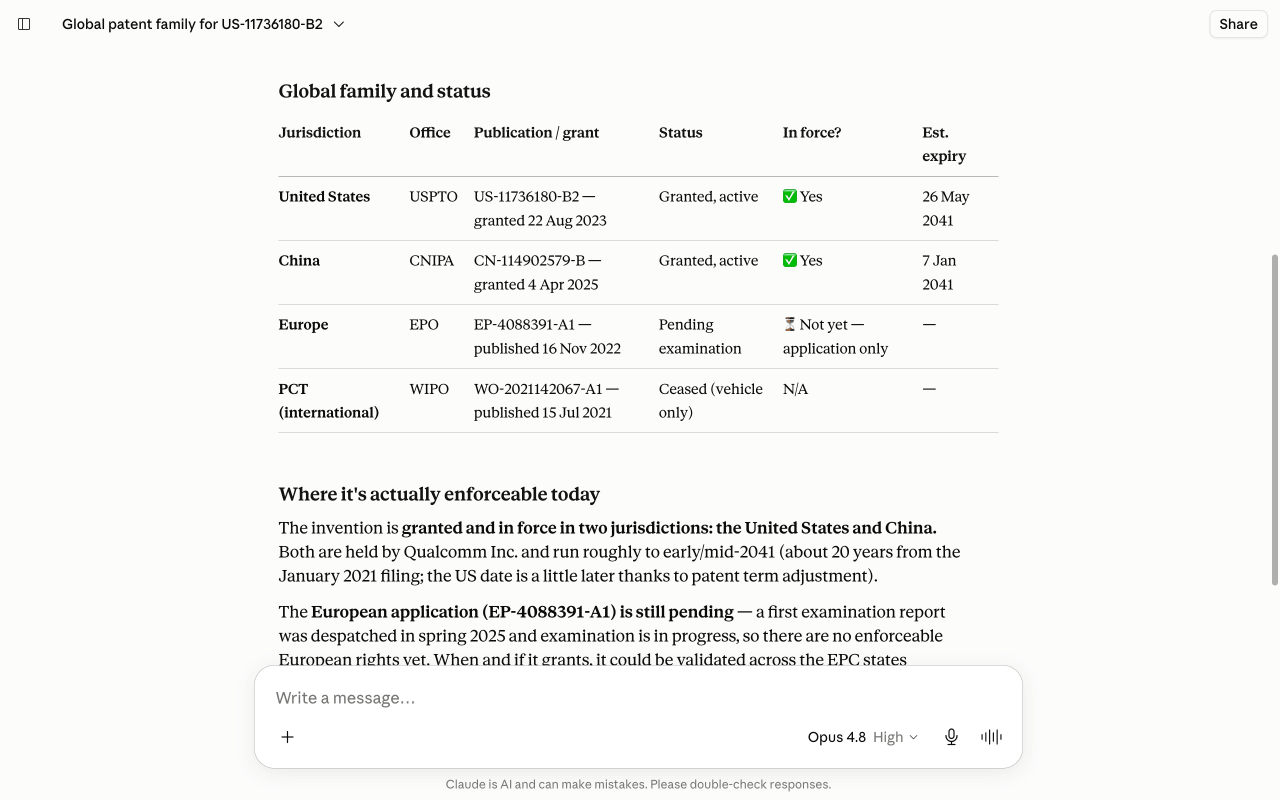
Show me the global patent family for US-11736180-B2: which countries and patent offices the same invention is filed in, and the legal status of each. Where is it still in force?
What you get
GoVeda calls get_patent with the family section and lists the INPADOC extended family: every related publication across jurisdictions, each with its authority, publication number, and legal status. You get a clear picture of where the invention is protected, where it has lapsed, and where it was never pursued. It usually lands in well under a minute.
Tips
Works for any publication number. The family GoVeda returns is the INPADOC extended family, the same grouping the official registers use, so it matches a patent office’s family view. Use it to scope global coverage before an enforcement or licensing decision, and confirm each member’s legal status against the official record, since recorded status can lag.
Next: browse more use cases or read the MCP tool reference.