Language Models
The language model understands your request, plans the steps and writes the answer or deliverable. Choose a model for each message, or set a default for new chats. Your files, project context, skills and research tools work alongside it. See What shapes the work.
Available models
The model picker lists these language models. Beside each one it shows the model’s effort, such as Medium or High. A model marked Pro needs a Pro subscription.
| Model | Provider | Description |
|---|---|---|
| GPT-6 Astra | OpenAI | OpenAI’s model for complex reasoning, research and coding. |
| GPT-6.1 Sol | OpenAI | An OpenAI reasoning model for demanding analysis. |
| GPT-6.1 Terra | OpenAI | A balanced OpenAI agent model for everyday research and report work. |
| Claude Opus 5.5 | Anthropic | Anthropic’s model for difficult, in-depth analysis. |
| Claude Sonnet 5.5 (default) | Anthropic | Anthropic’s balanced model for responsive agent work. |
| Claude Haiku 5.5 | Anthropic | Anthropic’s fastest, lowest-cost model for quick agent work. |
This list reflects GoVeda Agent in November 2026. The model picker in the product always shows the current models.
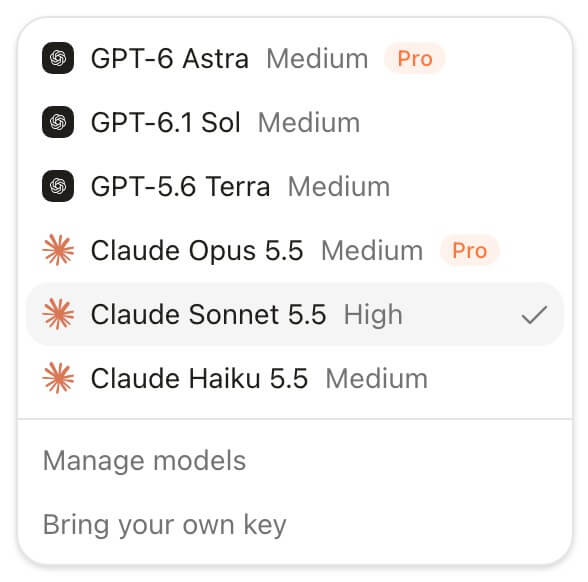
Choose a model for a message
- Open the model picker beside the message box.
- Choose the language model for your next message.
- Send your message.
You can choose a different model for each message, but you can’t change it while a task is running. If a model is no longer available, choose another one and send a new message.
The model you choose affects how many credits a task uses. See Credits & Usage.
Set your default and the models you see
- Open Settings › Models, or choose Manage models in the model picker.
- Under Language models, use the switches to show or hide models in the picker.
- Select Set as default beside the model you want new chats to start with. That model shows the Default badge.
Your default model is always shown, and making a hidden model the default shows it again. A chat or project that already uses a model keeps it even if you hide that model.
A project can set its own default model for new chats in that project. With Use the default model, the project follows your personal default. See Projects.
To have your own Anthropic or OpenAI account pay for the language model’s work, see Bring Your Own Key (BYOK).