Put Your Claude Max API Credits to Work on IP Research
If you pay for Claude Max or a Claude Team plan, Anthropic adds Claude API credits to your account every month. They are separate from your usage in the Claude apps, and anything you don’t spend expires at the end of the billing cycle.
GoVeda Agent can use those credits. Add an Anthropic API key from the organization that receives them, and every request GoVeda Agent sends to a Claude model is billed to your Anthropic account instead of your GoVeda credits. The searching and reading of IP data still runs on GoVeda.
This guide covers what the credits are, how to connect them in about five minutes, and what to watch for.
What API credits come with Claude plans?
As of October 28, 2026, Anthropic’s API credits for Max and Team plans page lists these monthly amounts:
| Claude plan | Monthly API credit |
|---|---|
| Max 5x | $100 |
| Max 20x | $200 |
| Team, Standard seat | $20 per seat |
| Team, Premium seat | $100 per seat |
Team credits are pooled into one monthly balance, capped at $500. You can claim them after seven days on an eligible plan. Free, Pro and Enterprise plans don’t include them. Check Anthropic’s page for the current terms before you plan around a number.
The credits arrive in a Claude Console organization you link to your plan. Any API key in that organization draws on them.
Why spend them in GoVeda Agent?
- They expire anyway. Unused credits don’t roll over, so research you run with them uses value you have already paid for.
- No GoVeda markup. GoVeda adds no fee for using your own key. The provider bills the model requests at its own prices.
- Your Claude app limits stay untouched. Anthropic states that the credits don’t change your usage limits in Claude or Claude Code.
- IP tools still run on GoVeda. GoVeda Agent still searches global IP records, reads full text and checks legal status with GoVeda’s own tools, so you get the same research, just with the model paid differently.
How do you connect them?
1. Claim the credits on claude.ai
On claude.ai, open Settings > Billing on a Max plan, or Organization settings > Billing on a Team plan. Under API credits, link the Claude Console organization that should receive them. You need to be the Max subscriber or a Team Owner, and an Owner, Admin or Billing member of the Console organization.
Each plan links to one Console organization and you can’t change it yourself, so pick the organization you want these credits in.
2. Create a key for GoVeda
In the Claude Console , create an API key in the linked organization. We recommend a workspace used only for GoVeda with a monthly spend limit . Every key in the organization shares the same credit balance, so a separate workspace keeps GoVeda from using up credits meant for other projects.
A Claude sign-in won’t work here. GoVeda Agent needs an API key.
3. Add the key in GoVeda Agent
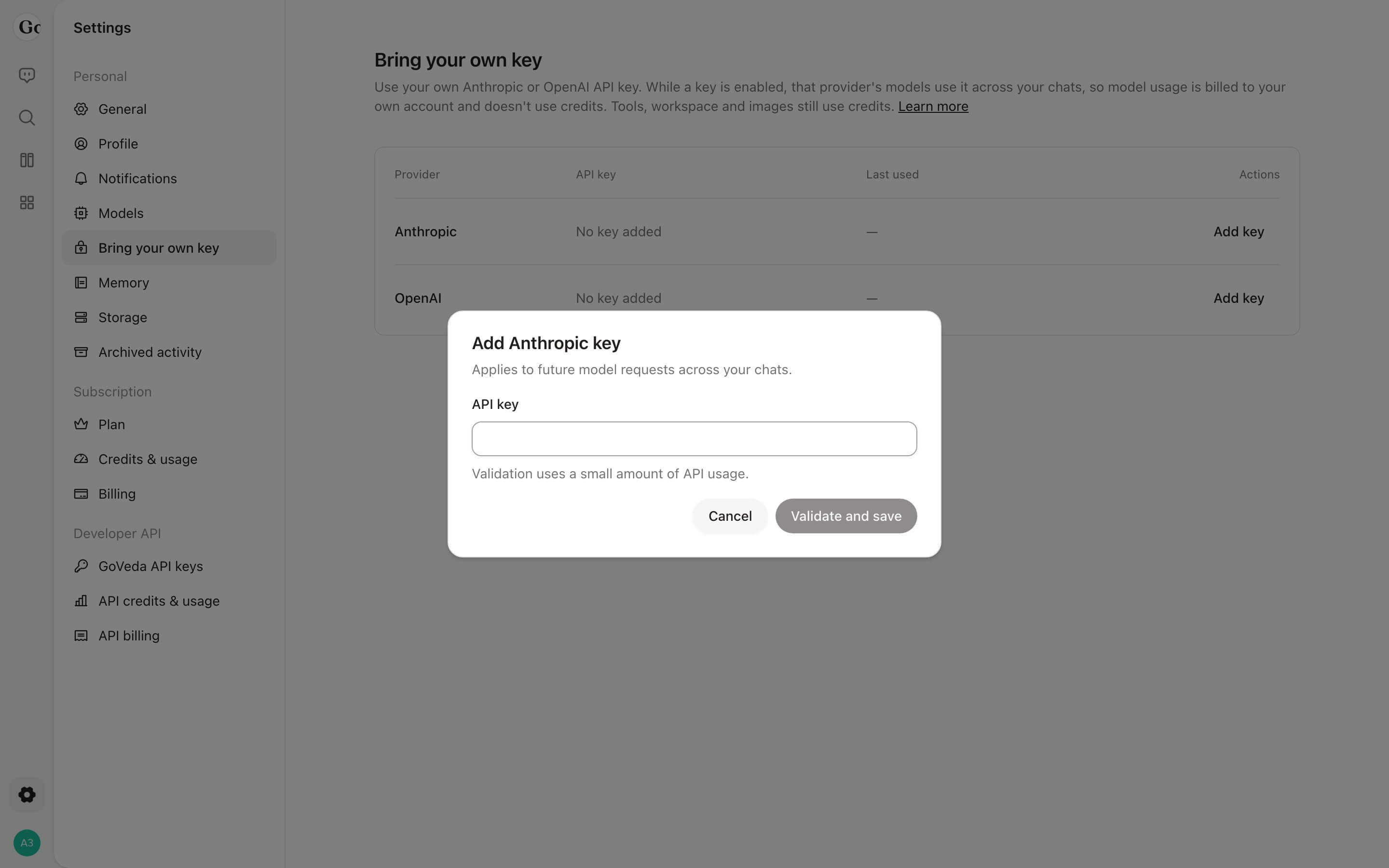
In GoVeda Agent, open Settings › Bring your own key. Click Add key next to Anthropic, paste the key and click Validate and save. Validation sends one short request, which costs less than $0.01.
4. Choose a Claude model and start
Pick any Claude model in the chat as usual. From the next request on, the model work is billed to your key. There is no per-chat switch: while the key is enabled, all Claude requests use it.
What do the credits pay for, and what still uses GoVeda credits?
The rule is simple: if the model is thinking or writing, your Anthropic account pays. If GoVeda is fetching, running or creating something for the model, GoVeda credits pay.
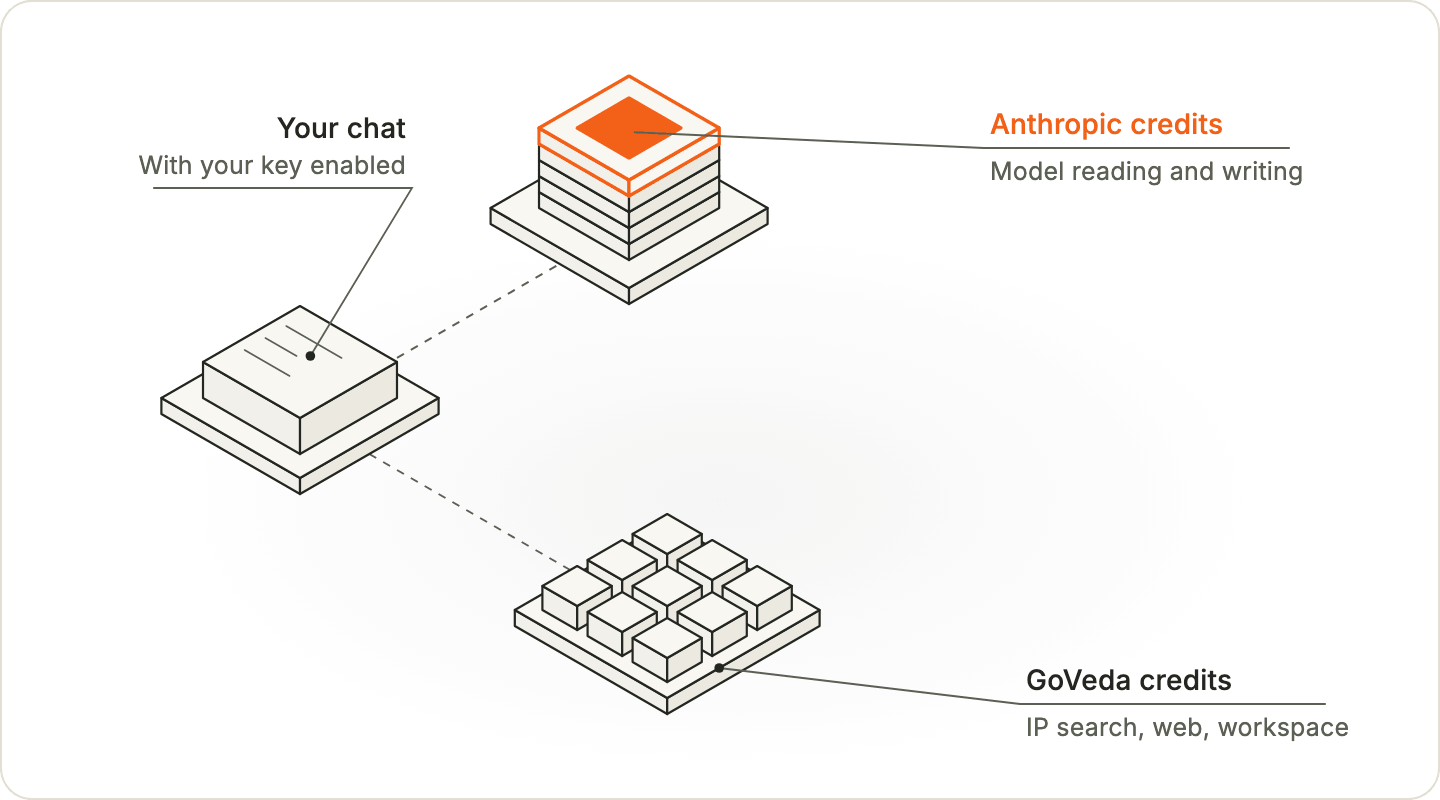
Paid from your Anthropic credits:
- The model reading your messages, files and tool results, and writing replies, plans and reports, in your chats
- Summarizing earlier parts of a long chat so it can continue
Paid from GoVeda credits:
- IP search, full text, legal status and other IP tools
- Web search and reading web pages
- Running code and working with files in your workspace
- Creating images
- GPT models, unless you also add an OpenAI key
For example, you ask a Claude model to find prior art for an invention. It runs four IP searches, reads ten IP documents and two web pages, then writes a summary. Your Anthropic credits cover the model reading the results and writing the summary. GoVeda deducts credits only for the searches and the reading.
In Settings › Credits & usage, records where your key paid for the model are marked (Anthropic API). Check what Anthropic charged on the Console’s usage page .
What happens when the credits run out?
Anthropic spends the included credits before any credits you bought. Once both are gone, Anthropic stops accepting requests until your next monthly credit arrives, unless you buy more or turn on auto-reload in the Console.
GoVeda Agent never switches to your GoVeda credits on its own. The chat pauses with Your API key has reached its usage limit. Add funds in the Console, or disable the key in GoVeda to go back to credits, then click Retry in the chat.
To keep a month’s credits from running out early, set the workspace spend limit below your monthly credit, and use smaller Claude models for routine lookups.
Frequently asked questions
Does using the API credits reduce my usage in the Claude app?
No. Anthropic keeps API credits separate from your Claude plan’s usage limits. Chats in GoVeda Agent draw on the API credits, not on your Claude app allowance.
I’m on Claude Pro. Can I still use my own key?
Yes. Pro doesn’t include monthly API credits, but you can add any Anthropic API key with billing set up, and Anthropic bills its usage to that account.
Can my whole team use our Team plan’s credits?
Each person adds a key to their own GoVeda account; keys aren’t shared through GoVeda. If everyone creates a key in the linked Console organization, they all draw on the same pooled credit, so set a spend limit on the workspace.
Is my key safe with GoVeda?
Your key is encrypted in your browser before it is sent and stays encrypted while stored. Only a separate, network-isolated service can decrypt it, and only to send a request to Anthropic. The AI and its tools never have it. See how your key is protected.
Where can I find the full details?
Bring Your Own Key (BYOK) covers supported providers, every error message and data retention.
This article is general information, not legal advice. For decisions on a specific matter, consult a qualified patent attorney or agent.
Claude is a trademark of Anthropic, PBC. Credit amounts and eligibility are Anthropic’s and can change; check Anthropic’s page for the current terms.