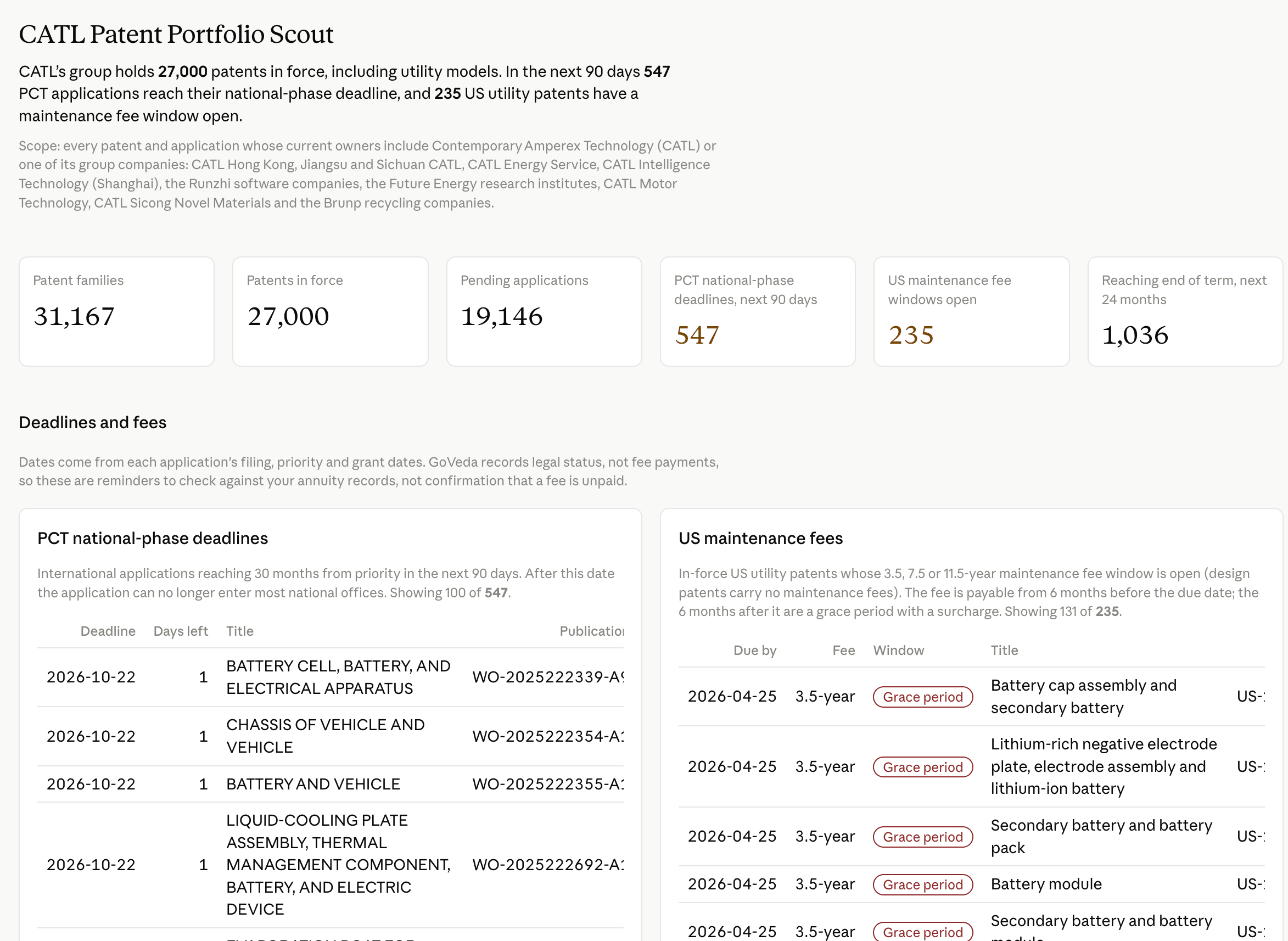
This is a patent portfolio dashboard we built in Claude, using the public patent portfolio of CATL, the battery maker, as the example. It counts the group’s patents, lists the deadlines coming up in the next few months, and reruns every query against the GoVeda patent database each time it opens.
Keeping track of a large portfolio usually means a docketing system for the deadlines and a separate report for everything else. Claude Dashboards , in beta on paid Claude plans, work with your connectors, so one page can show both and stay current without being rebuilt. The same approach also works for watching competitors.
What does a patent portfolio dashboard show?
The example covers CATL and its group companies, 23 patent-owner names in all. It has six parts.
| Part | Question it answers |
|---|---|
| Headline counts | How big is the portfolio, and how much of it is in force? |
| Deadlines and fees | Which deadlines are calculated to fall soon, and which fee windows are open? |
| Latest publications | What did the company publish in the last few weeks? |
| New patent families per year | How fast is filing growing, and in which patent types? |
| Technology and filing offices | Which technologies and which countries does the portfolio cover? |
| Legal status | How many applications are in force, pending, abandoned or expired? |
How is a live dashboard different from a one-off page?
If you ask Claude for a summary of a portfolio, Claude may build a one-off page rather than a live dashboard: it runs the queries once, writes the results into the page and hands it over. A live dashboard keeps the queries, so it goes back to the patent database whenever you open it. For deadlines, that difference decides whether the page is still useful next week.
| One-off page | Live dashboard | |
|---|---|---|
| Data | A snapshot from the day it was made | The latest data in the GoVeda database every time you open it |
| Days left on each deadline | Counted on the day the page was made | Counted again on every open |
| Fee windows | Only the patents whose window was open that day | New patents join as their window opens |
| Status changes | Missing until you ask Claude to rebuild the page | A newly granted or lapsed patent shows up once the database records it |
| Filters | Limited to the data already in the page | The date filter runs a fresh query against the full database |
| Trust | Figures on their own | Every figure links to the query behind it, and the rows that query returned can be downloaded as CSV |
| Team use | Everyone works from the same old copy | Each colleague sees current data through their own GoVeda connection |
A one-off page is fine for a snapshot you want to keep as it is, such as a quarter-end portfolio report. For deadlines, where the days left change every day, the dashboard does the rebuilding for you.
Which deadlines can it track?
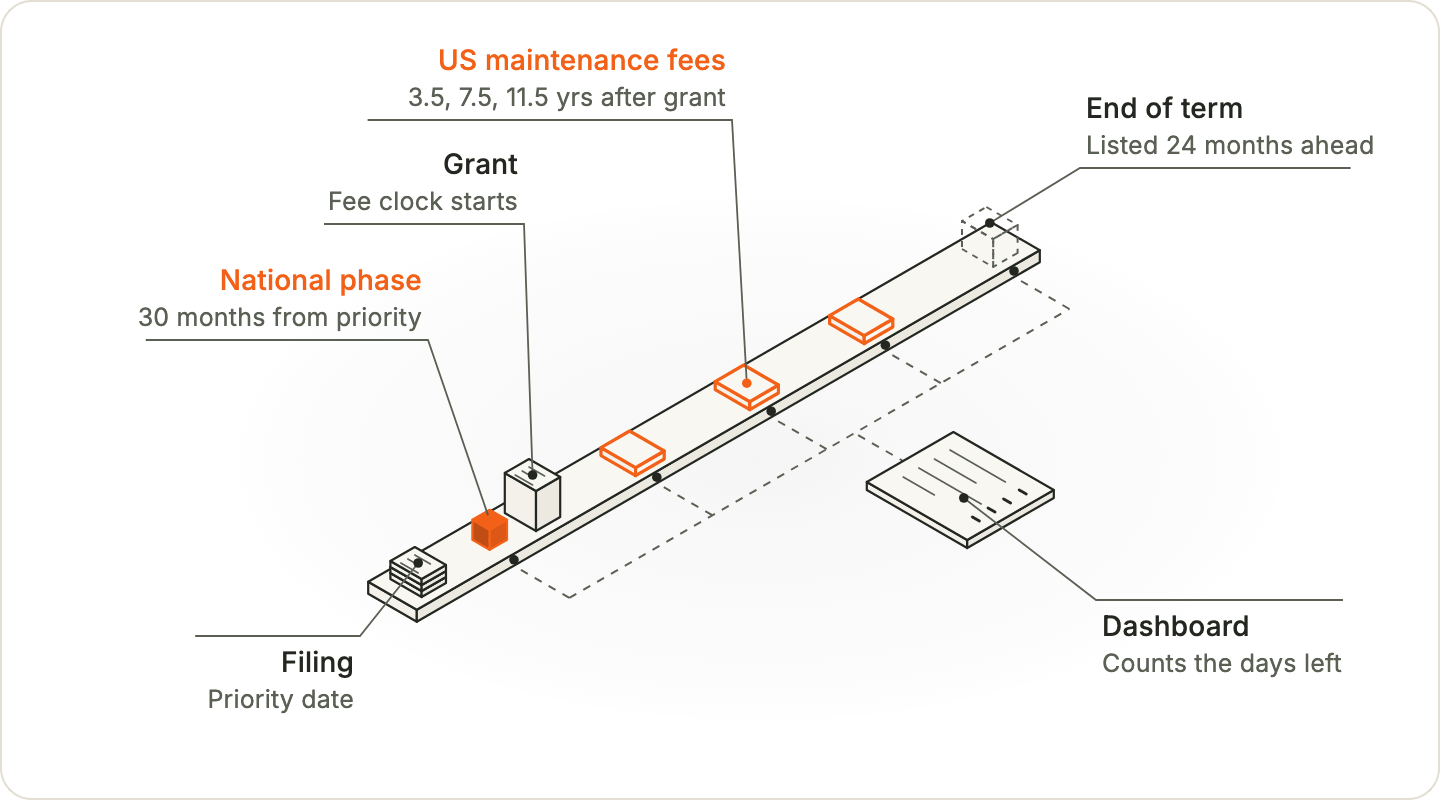
The dashboard works out deadlines from dates that GoVeda records for every application: the filing, priority, grant and expiry dates, and the current legal status.
- PCT national-phase deadlines. An international application generally has to enter the national phase within 30 months of its priority date , and GoVeda calculates that date for each pending PCT application. The dashboard lists those calculated to fall in the next 90 days, with the days left. The actual deadline belongs to each national or regional office: the European Patent Office allows 31 months, some offices allow longer or a paid extension, and a few still apply 20 months. The list can also include applications that have already entered the offices you need, or that were left to lapse on purpose.
- US maintenance fee windows. A US utility patent stays in force only if maintenance fees are paid at 3.5, 7.5 and 11.5 years after grant; design patents carry no maintenance fees. Each fee can be paid without a surcharge in the six months before its due date, and with a surcharge in the six months after. The dashboard lists in-force US utility patents whose window is open, the due date, and whether the patent is already in the surcharge period.
- End of term. The dashboard lists in-force patents whose term ends in the next 24 months. For CATL most of them are Chinese utility models, which last 10 years from filing .
- Where annual fees fall. Offices such as China, Japan and Korea charge annual fees on dates set by their own rules. The dashboard shows in-force applications by office and filing year, which tells you where those fees concentrate and how old the patents carrying them are.
How do you build one in Claude?
Connect GoVeda Patent
Add GoVeda Patent from Claude’s connector directory and sign in once. Using GoVeda Patent Inside Claude walks through it with screenshots.
Paste this prompt
Copy the prompt into a new Claude chat:
I want a dashboard in Claude that keeps track of one company's patent
portfolio and its upcoming deadlines, using GoVeda Patent data.

Before you build anything, ask me:
- which company's portfolio to track
- which patent offices matter most
Then look up every patent-owner name for that company in GoVeda,
including subsidiaries and group companies, and show me the list to
confirm before you start.

The dashboard should show:
- headline counts: patent families, patents in force and pending
  applications
- PCT applications whose national-phase deadline falls in the next
  90 days
- US utility patents whose maintenance fee window is open, with the
  due date
- patents whose term ends in the next 24 months
- in-force patents by office and filing year
- the latest publications, with a date filter
- new patent families per year, technology areas and filing offices

Use only the default patent record in lists so each refresh stays cheap,
and keep the data live so the dashboard reruns its queries each time I
open it.
Claude starts by asking which portfolio to track. It then finds the company’s patent-owner names, including subsidiaries, and asks you to confirm them before it builds anything. Confirming that list matters: for CATL, the patents sit under 23 names, from CATL Hong Kong to the Brunp recycling companies. After that, ask for changes in the same chat, such as a longer deadline window or another office.
What does CATL’s portfolio look like?
As of October 21, 2026, the dashboard showed the following for CATL’s group.
| Figure | Value |
|---|---|
| Patent families | 31,167 |
| Patents in force, including utility models | 27,000 |
| Pending applications | 19,146 |
| PCT national-phase deadlines in the next 90 days | 547 |
| US utility patents with a maintenance fee window open | 235 |
| In-force patents whose term ends in the next 24 months | 1,036 |
How fast is the portfolio growing?
New invention families, counted by earliest filing year, rose from 1,390 in 2021 to 4,918 in 2024, and 2024 is not fully published yet. Utility model families grew alongside, from 772 to 3,535.
Where is it in force?
Of the 27,000 patents in force, 13,147 are Chinese utility models and 7,173 are Chinese invention patents. Outside China, the largest counts of patents recorded as in force are in the United States (2,134), Japan (1,132) and Korea (841), plus 1,628 granted European patents.
Which technologies does it cover?
Secondary cells, battery housings and electrodes lead the classification counts. The portfolio also reaches into battery testing and state estimation, charging circuits, electric-vehicle battery swapping and solar cells.
How should you read the deadlines?
- They are reminders, not a docketing system. GoVeda does not record fee payments, national-phase entries or instructions to an agent, so a patent in the US list may already be paid and a PCT application may already have entered the offices you need. Use the lists to check your own records.
- Statuses follow the database. The GoVeda database is updated weekly, so the newest documents and statuses can lag slightly.
- Counts depend on the names you confirm. A subsidiary left off the list drops out of every figure.
- Lists show the soonest entries. Each deadline list shows up to 100 entries per page and states the full count above it. The US maintenance list combines three pages, one per fee stage, so it can show more.
What does it cost to keep running?
Each time the example dashboard opens or refreshes, it makes two statistics calls and six list pages, at 2 credits each: 16 credits in total. The US maintenance list takes three of those pages, one per fee stage, and changing the date filter on the latest publications runs that page again for another 2 credits. Looking up company names is free.
Lists cost 2 credits a page as long as they return the default patent record. Asking for extra fields adds 1 credit per patent returned, which is why the prompt asks for the default record. The MCP pricing page lists every tool’s price. Each viewer runs the queries with their own GoVeda account.
Frequently asked questions
Can a Claude dashboard tell me whether a patent fee has been paid?
No. GoVeda records each application’s legal status and its filing, priority, grant and expiry dates, not fee payments. The dashboard uses those dates to show when deadlines and fee windows fall, so treat its lists as reminders to check against your annuity records.
Why use a live dashboard instead of a page Claude generates once?
A one-off page is a snapshot from the day it was made, so its days-left counts and fee lists go stale. A live dashboard stores the queries instead, recounts every deadline each time it opens, adds patents as their fee windows open, and links every figure to the query behind it.
Which deadlines can the dashboard calculate?
PCT national-phase deadlines, calculated as 30 months from priority (individual offices can allow more or less time); US maintenance fee windows for utility patents, which follow fixed dates after grant; and the end of each patent’s term. Annual fees in offices such as China, Japan and Korea are shown as in-force counts by office and filing year.
Do I need to write code?
No. You paste a prompt into Claude, confirm the company names it finds, and Claude builds the dashboard and its queries. Changes are made the same way, in the chat.
What does the example dashboard cost to run?
16 credits each time it is opened or refreshed: two statistics calls and six list pages at 2 credits each. Looking up company names is free.
This article is general information, not legal advice. For decisions on a specific matter, consult a qualified patent attorney or agent.