This is an example patent watchlist dashboard we built in Claude for a hypothetical product, a wearable glucose monitor. It follows 36 US patents and applications picked by a semantic search, and every status, date and count on it comes from a live query to the GoVeda patent database.
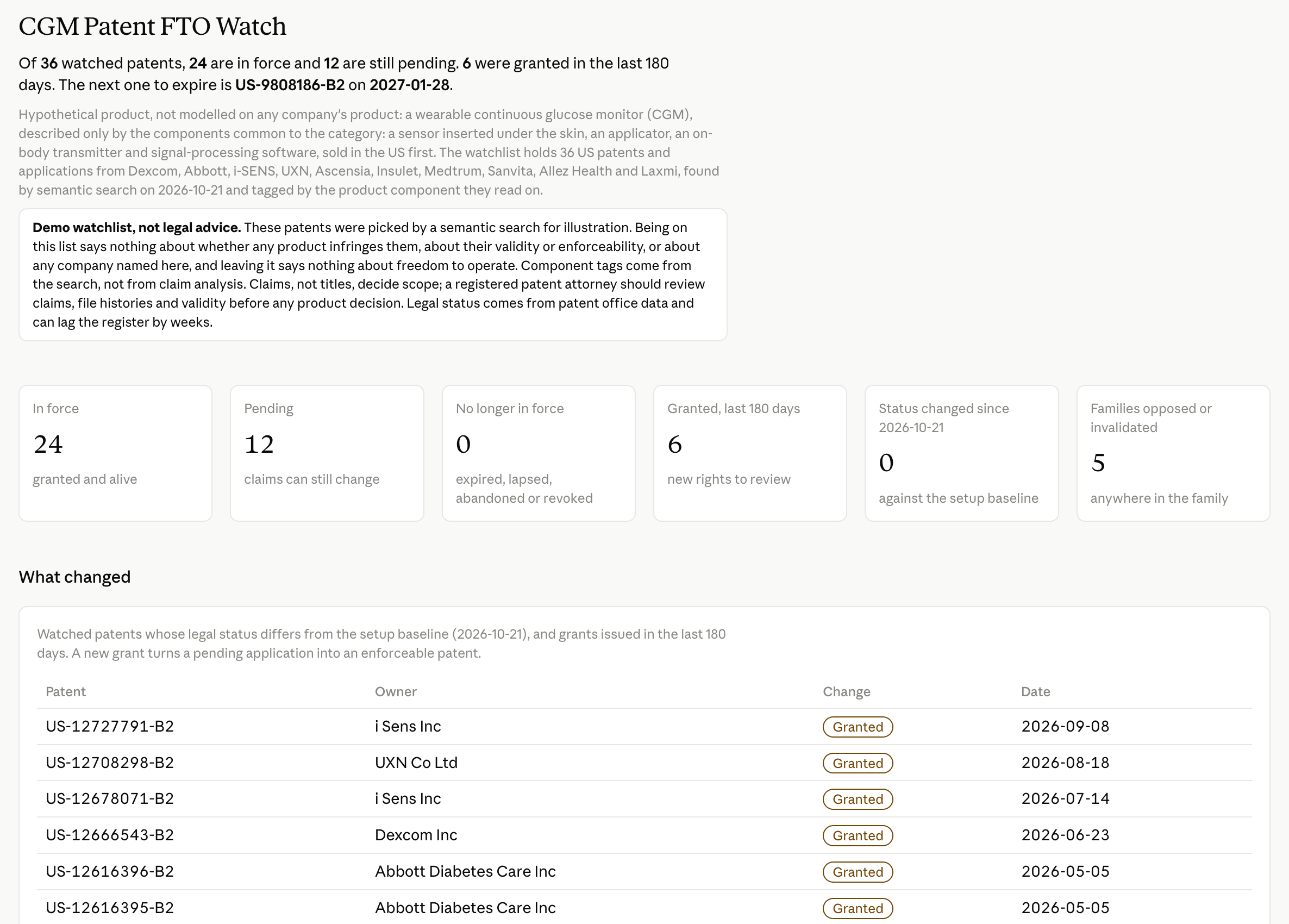
The watchlist is a demonstration. The product is hypothetical and not modelled on any company’s product, and the patents were picked by a semantic search to show how the dashboard works. Being on the list implies nothing about whether any product infringes these patents, about their validity or enforceability, or about any company named on the dashboard or in the screenshots. The component tags come from the search, not from a comparison of claims, and nothing on the dashboard is a freedom-to-operate opinion.
A freedom-to-operate (FTO) review is a snapshot. A patent attorney compares the product with the claims of the patents that matter on the day of the review, and the patent landscape keeps moving after that: pending applications get granted, patents expire or lapse, families reach new countries, and some patents are opposed or change hands. Product and legal teams usually track these changes in a spreadsheet that someone updates by hand.
Claude Dashboards , in beta on paid Claude plans since October 2026, work with your connectors. A dashboard built on GoVeda Patent reruns its queries each time it opens, so the status of every watched patent stays in step with the GoVeda database without anyone updating it. This post shows what such a dashboard tracks, how to build one with a single prompt, what our example shows today and what it costs to keep running.
What does an FTO watchlist dashboard track?
The dashboard follows patents you have already decided to watch, and answers the questions a product or legal team asks about them between formal reviews.
| Part | Question it answers |
|---|---|
| Summary tiles | How many watched patents are in force, pending, or no longer in force? |
| What changed | Which patents changed status since the list was set up, and which were granted in the last 180 days? |
| Expiry timeline | When does each in-force patent expire? |
| Pending: where prosecution stands | Which pending US applications are close to grant? |
| Family reach | In which countries is each patent family still alive? |
| Legal events | Has anything in the family been opposed, invalidated, transferred or licensed? |
| Watchlist | What is the full list, filtered by product component or owner? |
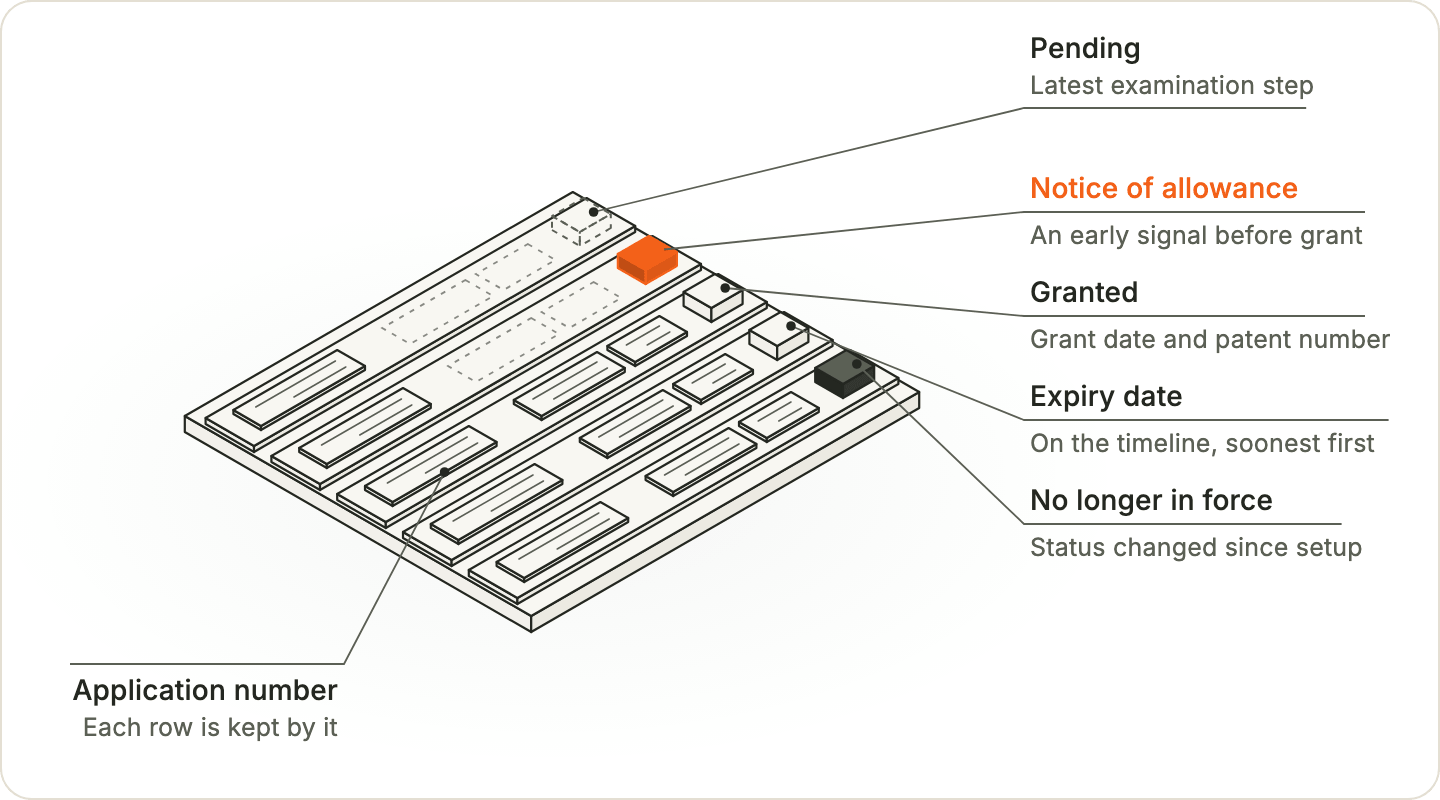
The watchlist is kept by application number. When a pending application is granted, it stays on the list and its row shows the grant date and the granted patent number.
How is a live dashboard different from a one-off page?
If you ask Claude for a table of your watched patents, Claude may build a one-off page rather than a live dashboard: it runs the queries once, writes the results into the page and hands it over. A live dashboard keeps the queries, so it goes back to the patent database whenever you open it.
| One-off page | Live dashboard | |
|---|---|---|
| Data | A snapshot from the day it was made | The latest status in the GoVeda database every time you open it |
| Grants and lapses | A watched application that is granted, or a patent that lapses, stays as it was until you ask Claude to rebuild the page | Shows up the next time you open it after the database records it |
| Examination steps | Frozen at build time; a new notice of allowance is missing until the page is rebuilt | Once the database records a new notice of allowance, it appears the next time you load the examination status |
| Family reach | Counted once, on the day the page was made | Each open recounts every family’s applications by office, so a new family member shows up once the database records it |
| Traceability | Figures as written at build time | Every figure links to the query behind it, and the rows that query returned can be downloaded as CSV |
| Upkeep | Rebuild and re-check for each update | Build once, open it before each review meeting |
| Team use | Everyone works from a copy frozen on the day it was made | Each colleague sees the latest data in the GoVeda database through their own GoVeda connection |
A one-off page is fine for a snapshot you want to keep as it is, such as the watchlist on the day of an FTO review. For patents you follow over months, the dashboard does the rebuilding for you.
How do you build one in Claude?
Connect GoVeda Patent
Add GoVeda Patent from Claude’s connector directory and sign in once. Using GoVeda Patent Inside Claude walks through it with screenshots.
Paste this prompt
Copy the prompt into a new Claude chat:
I want a live dashboard in Claude that watches the patents my product
team needs to follow, using GoVeda Patent data.

Before you build anything, agree on the scope with me:
- Ask whether I already have a list of patent or application numbers.
  If I do, use it as the watchlist.
- If I don't, ask me to describe the product and its main components,
  then use GoVeda to suggest 20 to 40 pending or in-force patents that
  look relevant. Tag each one with the component it relates to.
- Ask which countries or patent offices matter for the launch.
Show me the proposed watchlist and wait for my confirmation.

Treat the list as a monitoring aid only. Do not judge infringement or
freedom to operate; that is for my patent attorney.

The dashboard should show:
- each patent's legal status, grant date, expiry date and owner
- what changed since the list was set up, and grants in the last
  180 days
- a timeline of when each in-force patent expires
- for each family, the countries where it is still alive
- oppositions, invalidations, transfers and licenses on record
- for pending US applications, the latest examination step, such as
  a notice of allowance, loaded only when I ask

Keep the data live, so the dashboard runs its queries again each time
I open it. Tell me what one open costs in GoVeda credits.
Claude starts by agreeing on the scope with you. If you already have a list of patent numbers, for example from an earlier FTO review, it uses that list. If you don’t, it asks about the product, suggests candidate patents and waits for you to confirm them. After that, ask for changes in the same chat: another patent, another country or a different chart.
What does the example dashboard show today?
Our hypothetical product is a wearable continuous glucose monitor described only by the components common to the category: a sensor inserted under the skin, an applicator, an on-body transmitter and signal-processing software, launching in the US first. The watchlist holds 36 US patents and applications owned by ten companies, each tagged with the product component the search linked it to. Again, the list is a demonstration, not an infringement or validity assessment.
| Measure | Value |
|---|---|
| Watched patents and applications | 36 |
| In force | 24 |
| Pending | 12 |
| Granted in the last 180 days | 6 |
| Pending applications with a notice of allowance | 4 |
| In-force patents expiring before the end of 2027 | 3 |
| Applications in the 36 patent families | 460 |
| Of those, still alive | 334 |
| Families with an opposition on record | 4 |
| Families with an invalidation on record | 2 |
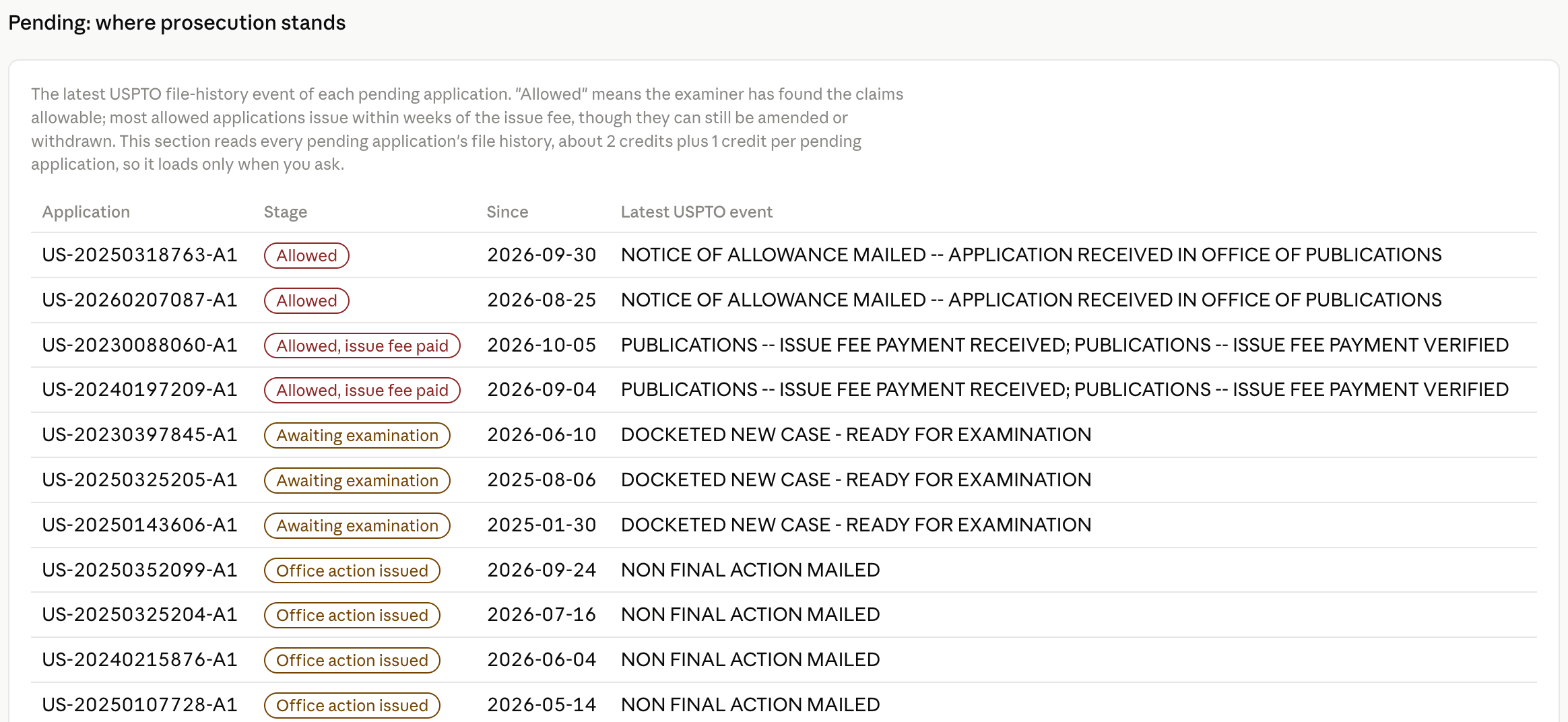
Which pending applications are close to grant?
Four of the twelve pending applications have received a notice of allowance from the USPTO, meaning the examiner has found their claims allowable. For two of them the issue fee has already been paid. The issue fee is due three months after the notice of allowance, and that period cannot be extended (MPEP 1306 ). An allowance is an early signal: the allowed claims are usually close to final, although an application can still be amended or withdrawn from issue, so a patent attorney can start reading them before the patent issues.
When do the in-force patents expire?
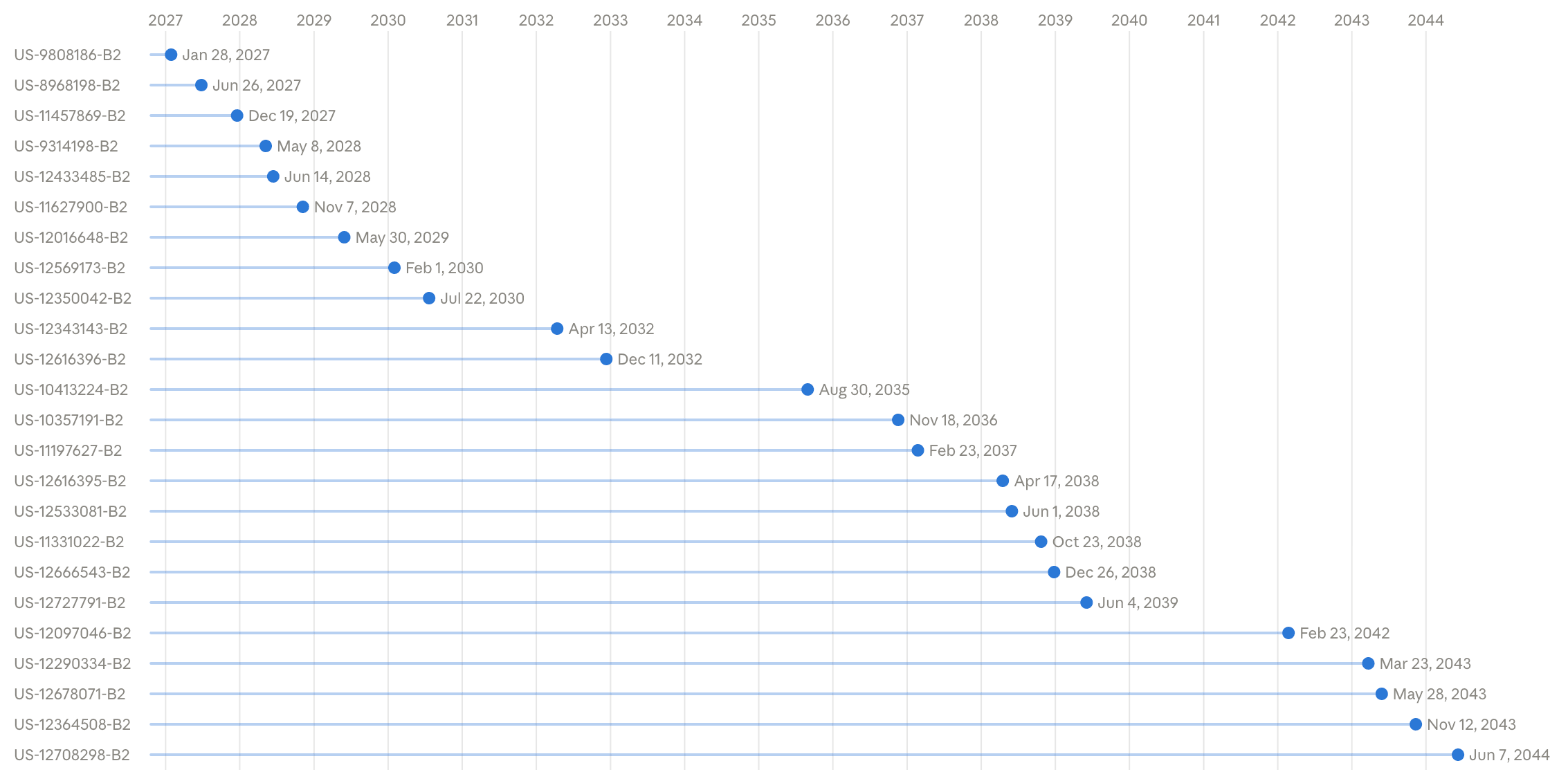
The earliest in-force patent on the list expires in January 2027, and three expire before the end of 2027. The latest run to 2044. The expiry timeline puts them on one axis, soonest first.
Where else are the families alive?
The 36 families contain 460 applications worldwide, and 334 of them are still pending, granted or in force, or are international (PCT) applications still open to enter national phase. 22 of the 36 families also have applications in Europe, Japan or China. The example monitors US status only; the family members outside the US are shown for context.
What legal events are on record?
Four families include an opposition, and two include an invalidation. Three families record ownership transfers. These are signals for an attorney to read: an opposition or invalidation elsewhere in a family can point to prior art, and a transfer changes who could enforce a patent.
Which changes can the dashboard catch, and which can’t it?
The dashboard is good at the changes that leave a dated record:
- Grants. Each grant has a date, so “granted in the last 180 days” is exact.
- Examination steps. US file-history events, such as office actions, final rejections and notices of allowance, carry their own dates.
- Status against the setup baseline. The dashboard saves each patent’s status on the day the watchlist was set up and compares today’s status with it.
Some things it does not show:
- The most recent changes. GoVeda’s patent data is updated weekly, so check the official patent register before acting on a recent change.
- Patents that are not on the list. The dashboard follows the patents you chose. It does not search for newly published patents or applications that might also matter.
- A full history of status changes. GoVeda returns each application’s current status, not the date it lapsed or was abandoned. The dashboard shows what changed since setup, not every change in between.
- Private licenses and court cases. Licenses appear only when a patent office registers them, and court cases are not part of the dashboard. Oppositions and invalidations appear where a patent office records them as legal events, so check the official register for any proceeding that matters.
- Claim scope. The dashboard tracks status. Whether a product falls within a patent’s claims is the question an FTO opinion answers.
How should you read the expiry dates?
- US patent term. A US utility patent’s term ends 20 years from its US filing date or, for a continuation or divisional, from the earliest non-provisional US or international application whose benefit it claims. Provisional applications and foreign priority do not count (MPEP 2701 ). A continuation can therefore expire soon after it is granted.
- Adjusted and anticipated dates. Where a term adjustment for USPTO delay is recorded, the dashboard shows the adjusted date. Otherwise it shows the anticipated end of the term.
- Terminal disclaimers. A terminal disclaimer can make a patent expire with an earlier patent, so the real date can be earlier than the one shown.
- Term extensions. Patents on some medical devices, drugs and other products that waited for regulatory approval can have their term extended under 35 U.S.C. 156 (MPEP 2750 ), so the real date can be later than the one shown.
- Unpaid maintenance fees. A US patent expires if a maintenance fee is not paid by the end of its six-month grace period, which shows up as a change of status. The USPTO can still accept a late payment if the delay was unintentional, and the patent is then treated as not having expired (MPEP 2590 ).
- Pending applications. An application has no term until it is granted.
What does it cost to keep running?
Opening the example dashboard runs three queries: one list page of the watched applications at 2 credits and two statistics calls on their families at 2 credits each. That is 6 credits per open or refresh.
The Pending: where prosecution stands section loads only when someone asks for it. It lists the pending applications (2 credits) and reads each one’s file history at 1 credit per application, so with twelve pending applications it costs 14 credits.
Building the watchlist is a one-time cost: each semantic search costs 20 credits. The MCP pricing page lists every tool’s price. Each viewer runs the queries with their own GoVeda account, so colleagues need GoVeda connected in Claude to see the data, and their opens use their own credits.
Where does a watchlist fit in an FTO process?
A freedom-to-operate analysis answers a legal question at a point in time: would making, using, selling or importing the product fall within the claims of an in-force patent where that happens? The watchlist does not answer that question. It helps a team notice when the answer may need another look, for example when an application on the list is allowed, a patent changes hands, or a family enters a new market. Decisions about a product should rest on the attorney’s review of the claims, not on the dashboard.
Frequently asked questions
Can a patent watchlist dashboard replace a freedom-to-operate opinion?
No. The dashboard tracks the status of patents you already chose to watch: grants, allowances, expiry dates and legal events. Whether a product infringes a patent depends on its claims, which a patent attorney has to compare with the product.
How is a live dashboard different from a page Claude generates once?
A one-off page is a snapshot of the watchlist from the day Claude made it. A live dashboard stores the queries instead, so a grant or lapse shows up the next time you open it after the database records it, a recorded notice of allowance appears the next time you load the examination status, and every figure links to the query behind it.
How does the dashboard know that a pending application was granted?
It follows each watched application by its application number, so the same row shows the grant date and the granted patent number once the patent issues. For pending US applications, it can also show the latest examination step, such as a notice of allowance, which usually comes weeks or months before the grant.
Does the dashboard keep a history of status changes?
No. GoVeda returns each application’s current status and its grant date. The dashboard compares the current status with the status saved when the watchlist was set up, so it shows what changed since then, not every change in between.
What does the example dashboard cost to run?
Opening it costs 6 GoVeda credits: one list page at 2 credits and two statistics calls at 2 credits each. Checking the examination status of pending applications adds 2 credits plus 1 credit per pending application.
This article is general information, not legal advice. For decisions on a specific matter, consult a qualified patent attorney or agent.